
npm 12 blocked --ignore-scripts bypasses. Jscrambler's compromise found another way in three days
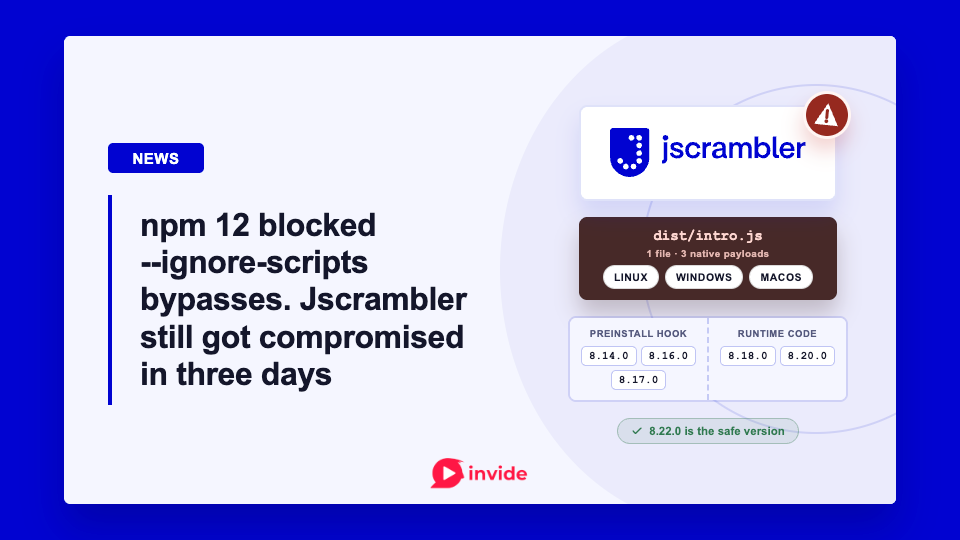
On July 11, Jscrambler disclosed that someone had used an npm publishing credential to release a malicious version of its official jscrambler package, the CLI used with its Code Integrity product. The company says it revoked and rotated the relevant credentials, deprecated the affected releases, and published 8.22.0 as the safe version. Its investigation is still ongoing. Jscrambler's advisory says npm initially showed zero downloads for the affected release, but also warns that the number can take time to update.
This is not only another reason to be careful with npm updates. The more useful detail is how the campaign changed during a few hours on July 11.
The first malicious releases used an ordinary-looking supply-chain trick: an undocumented preinstall script. Independent analysis from StepSecurity and Socket found that the script unpacked and launched a platform-specific native binary on Linux, Windows, or macOS. Socket says it detected and flagged the first release six minutes after publication. That is fast, but it also gives an idea of how little time a malicious update needs to reach an automated build.
Then the delivery moved. Later malicious releases placed the same loader in normal package code, where it runs when the package is imported or its CLI is invoked. That is where this stops being only an install-script story.
The version list needs care
Jscrambler's advisory lists 8.14, 8.16, 8.17, and 8.20 as affected, and says 8.22 is safe. Socket, StepSecurity, SafeDep, and JFrog independently identify five malicious releases: 8.14.0, 8.16.0, 8.17.0, 8.18.0, and 8.20.0.
The important practical point is not to turn that discrepancy into a guessing game. Teams with Jscrambler in a lockfile, build image, or CI cache should check all five versions. If any was installed or executed, treat the environment as potentially compromised and follow the vendor's incident guidance.
The package is often used in build pipelines, which makes the exposure more awkward than a bad dependency on a developer laptop. CI jobs commonly have repository credentials, registry tokens, deployment keys, cloud variables, and sometimes production-adjacent access. Socket's analysis notes that the malicious binary could run with whatever secrets were available to the npm process.
--ignore-scripts would not have covered the later releases
The timing made this especially awkward. npm 12.0.0 shipped on July 8, three days before the Jscrambler incident. Its new default makes dependency lifecycle scripts opt-in, so it would have blocked the campaign's original preinstall path unless a project explicitly allowed it. npm had just made the common advice more effective, and the attacker then moved the loader to a path that did not depend on lifecycle scripts.
Skipping lifecycle scripts is still a sensible control. It can stop a preinstall, install, or postinstall hook from running automatically. It would have mattered for the first Jscrambler releases.
But it is not a package-security model by itself.
According to Socket and StepSecurity, versions 8.18.0 and 8.20.0 moved the loader to dist/index.js and the CLI path. The package did not need a lifecycle hook at that point. Requiring the module or running the command could trigger the same payload.
That is a useful distinction for teams that have recently added package-manager controls such as a minimum package age or disabled install scripts. Those controls reduce a real risk. They do not establish that a newly published package is safe to execute.
The payload was not a tiny JavaScript snippet hidden in a dependency tree, either. Researchers found a custom container disguised as dist/intro.js, containing Rust-built binaries for Linux, Windows, and macOS. JFrog's analysis says the malware searches for npm credentials and can use stolen credentials to republish infected packages. That makes fast containment and credential rotation much more important than simply upgrading the dependency.
The practical response is broader than updating one package
If a team resolves one of the affected versions, the first task is to establish where it ran: a developer machine, a CI runner, a container image, or a cached build environment. Removing the dependency is necessary, but it does not undo a payload that already ran.
The next work is less exciting and more important: rotate secrets exposed to that environment, invalidate relevant npm credentials, review publish activity, and rebuild from a clean base where practical. For CI systems, it is also worth checking whether long-lived registry tokens or broad cloud credentials were available when the job ran.
The r/programming discussion around the incident has already moved toward package age policies, lockfile pinning, and disabling lifecycle scripts. Those are worthwhile improvements. This campaign is a reminder to keep the claim modest: they make a compromise harder to land, but they do not make a trusted package safe once its publisher or release pipeline is compromised.
For npm users, that may be the durable lesson. Package metadata is useful signal, not a security boundary. A dependency can have no suspicious lifecycle script and still execute malicious code the moment your build uses it.

Member discussion