
7 WWDC 2026 announcements Apple developers should know

Apple’s annual developer event, WWDC26, took place during the week of June 8, 2026. The event featured the expected OS updates, new betas, platform sessions, and a significant amount of Apple Intelligence material.

The AI component received the most attention, which is understandable. Apple introduced updates to Siri AI, Foundation Models, App Intents, Image Playground, Visual Intelligence, Xcode agents, and Private Cloud Compute.
However, upon reviewing the developer material, a more significant pattern emerges not only from the addition of new AI features but also from Apple’s intention to enhance the structure of applications.
This is evident in various areas. App Intents simplifies the understanding of app actions and entities by Siri and Spotlight. Foundation Models provides Swift apps with a native method to access models. Core AI and MLX make local model execution more practical on Apple Silicon. Xcode is being enhanced with agents, Device Hub, and improved tooling for localization and performance.
Therefore, this is not a comprehensive WWDC recap but rather a practical overview of the announcements most relevant to developers: where Apple is making applications more visible to the operating system, where AI capabilities are becoming more integrated with the platform, and where the everyday build-test-ship workflow is undergoing transformation.
1. MLX makes Apple Silicon more relevant for local AI development
MLX is Apple’s open-source array framework for Apple Silicon. At WWDC26, Apple highlighted support for Metal 4 and GPU Neural Accelerators. It also demonstrated distributed inference and training across multiple Macs using RDMA over Thunderbolt. This is a specialized capability but becomes relevant when a team is experimenting with local agents, fine-tuning, embeddings, or custom inference before deciding what should be included in the product.
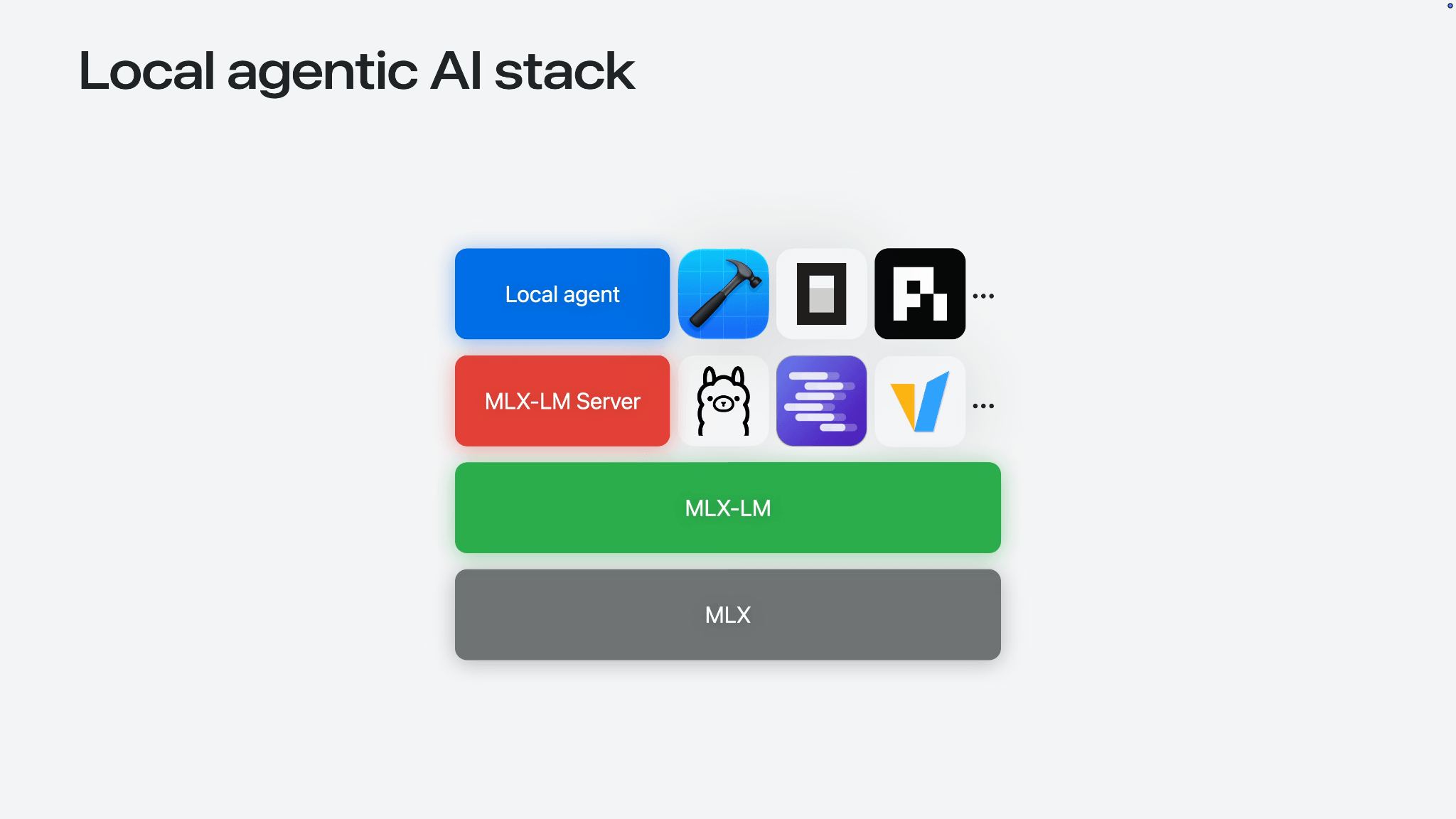
The local agent stack Apple demonstrated is a useful way to conceptualize the change. MLX is positioned at the bottom. MLX-LM is positioned above it. Local tools and agents can then use this stack without sending every experiment to a remote provider.
This does not transform a typical iOS app team into a model lab. Most teams will still use higher-level APIs or server models. The more significant point is that Apple is making the Mac a more credible platform for early model work, particularly when privacy, latency, or offline testing is a priority.
A prototype can begin on local Apple Silicon, progress through MLX experimentation, and subsequently be integrated into an app via Core AI, Foundation Models, or a server-backed architecture. MLX remains closer to research and prototyping than everyday app user interface work, but it is now part of the same Apple Silicon narrative.
2. Foundation Models framework gives Swift apps a native AI layer
The most developer-facing AI announcement was the Foundation Models framework. Apple is providing developers with a native Swift API for building features on top of Apple Intelligence models, with support for guided generation, streaming, tool calling, multimodal prompts, and model profiles.
This announcement is distinct from adding a smart feature to Notes or Photos. It provides app developers with a supported way to build AI behavior that feels integrated into the platform rather than a separate web service.
The initial wave of useful features may be limited: generating summaries from user-owned content, assisting users in transforming text, extracting structure from unstructured input, offering suggestions within an existing workflow, or allowing a feature to explain its intended action before user confirmation. A chat box is only one form this can take and is often not the most suitable.
Apple is also linking this to privacy and availability. The framework can use on-device models, and Apple directs developers to Private Cloud Compute for server-side intelligence in supported cases. The framework can also work with language models beyond Apple Foundation Models, including cloud models such as Claude and Gemini via the Language Model protocol.
This is significant because MacRumors reported that Apple’s new AI architecture is built around Google Gemini models. Apple is still presenting the developer surface as Apple Intelligence, Foundation Models, and Private Cloud Compute, but the underlying provider story is more complex than a purely in-house model stack.
The practical constraint remains the same as for every AI feature: a framework simplifies model calls but does not determine the feature’s purpose, data requirements, failure conditions, or user control. Product judgment remains crucial.
3. App Intents is becoming the integration contract for Siri and Apple Intelligence
Foundation Models is concerned with calling models from within apps, whereas App Intents enables the system to understand an app’s capabilities.
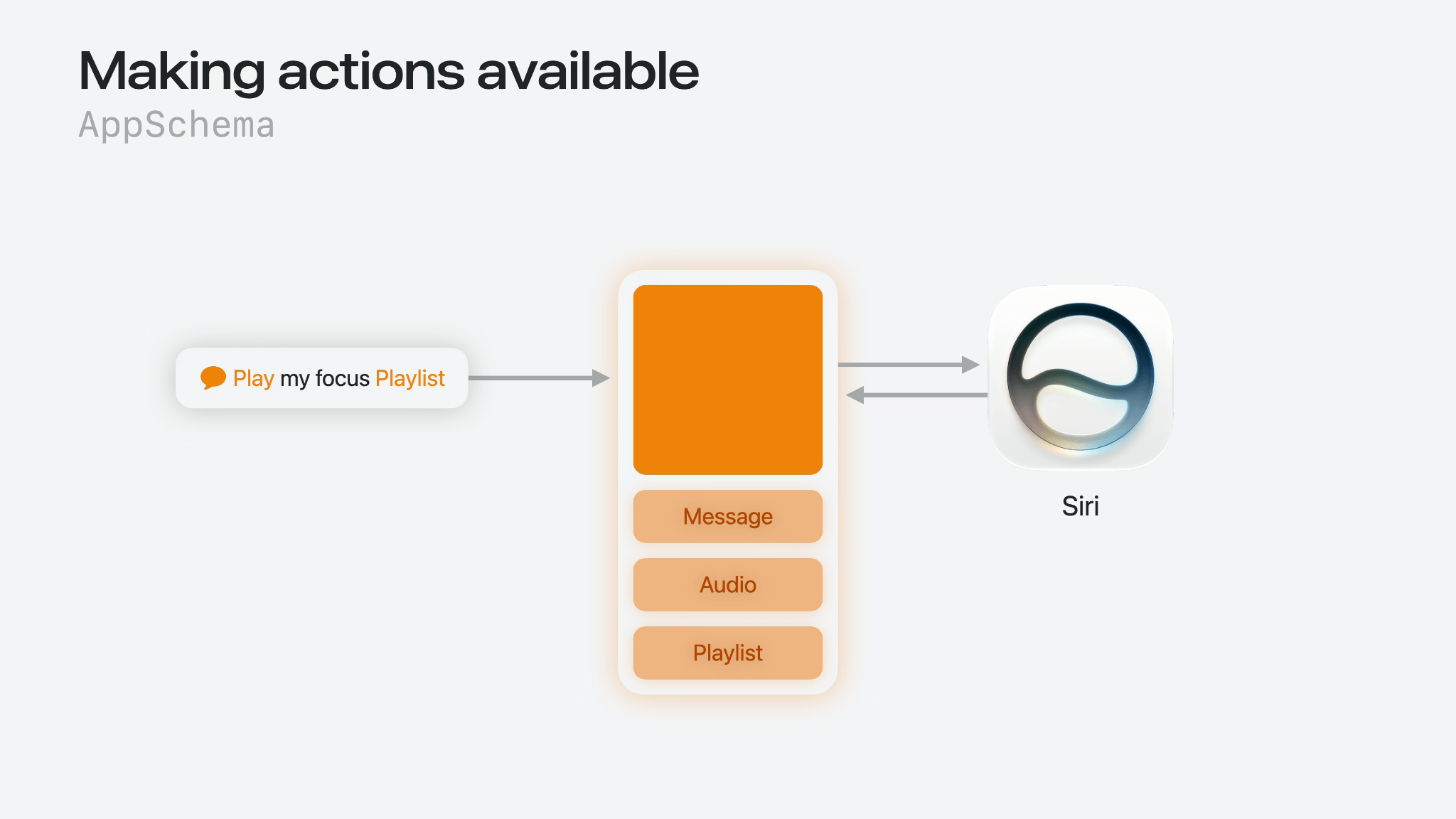
Apple’s WWDC26 App Intents work is directly linked to Siri AI and Apple Intelligence. The framework now emphasizes schemas: entity schemas that contribute app content to Spotlight’s semantic index and intent schemas that expose actions the system can understand through natural language. Apple also introduced View Annotations so apps can map visible UI to entities that Siri can reference conversationally.
This concept may seem abstract until considered in the current state of many apps. A significant amount of app behavior is confined to screens. The system can launch the app, potentially deep link to a route, or execute a few shortcuts. However, it does not always comprehend the user’s visual input, the significance of objects, or the safe actions to take from that state.
App Intents aims to address this gap. If a task app exposes tasks as structured entities or a photo editor exposes editing actions through a system schema, Siri has a greater likelihood of performing useful work without the developer writing extensive phrase handling code.
The new App Intents Testing framework is also important. Trust in Siri and Spotlight integrations is difficult to establish if they can only be verified manually. Testing through real system pathways provides teams with a more effective method of identifying broken entity mapping, missing intent behavior, or assumptions that were only demonstrated in a demo account.
For developers, the key takeaway is straightforward. If Apple Intelligence becomes a meaningful entry point into applications, App Intents becomes less optional. It is no longer a feature of the Shortcuts app but a means of making an application’s content and actions available to the operating system.
4. Core AI gives custom models a lower-level on-device path
Apple also introduced Core AI, a new framework for running custom AI models on Apple Silicon. This is distinct from calling Apple’s Foundation Models. It is designed for teams that want to bring their own models and run them on-device.
This distinction is important. Foundation Models is useful when Apple’s model can perform the task and the application primarily requires a robust API. Core AI is for cases where the model is integral to the application’s product logic, such as computer vision, audio processing, domain-specific generation, custom embeddings, compact local models, or specialized inference that cannot depend on a remote service.
Apple describes Core AI as a Swift API for loading, specializing, and running models on-device, with ahead-of-time compilation, hardware specialization, stateful execution, zero-copy data paths, and control over inference memory. These details are not merely low-level enhancements but are crucial because local AI features often fail due to constraints such as startup time, memory pressure, battery usage, device differences, and the cost of moving tensors.
The appeal is clear. On-device models can maintain user data privacy, operate without a network dependency, and avoid token-based server costs. For some applications, this is the difference between a feature that can be widely deployed and one that is restricted to paid users or high-end devices.
The trade-off is ownership. Once the model belongs to the application, so do model size, conversion, testing, fallback behavior, performance across devices, and the question of whether the feature is sufficient without a server model.
Core AI fills a gap between high-level Apple Intelligence APIs and lower-level ML infrastructure. For teams already managing custom models, this gap is not theoretical.
5. Xcode 27 brings coding agents into the official Apple workflow
Xcode 27 represents a significant advancement beyond editor improvements. Apple is integrating coding agents directly into the development environment, supporting the developer’s preferred model and varying levels of agent involvement based on the task.
This is a substantial platform signal. Apple is not treating AI coding as an external workflow executed in a separate tool and subsequently integrated into Xcode. Instead, it is embedding the pattern within the environment where Apple developers already build, debug, profile, localize, and ship applications.
The most compelling aspect is not the agent’s ability to generate code. Developers already have numerous methods for this purpose. The greater value lies in the context provided by Xcode. It can comprehend project structure, SwiftUI conventions, string catalogs, localization guidance, devices, build settings, and platform APIs. An agent within Xcode can, at least in theory, operate more closely to the constraints of an Apple application.
Apple has also integrated agents with localization. Xcode can use agents for tasks such as adding languages, updating string catalogs, translating strings, and generating plural variants with app context. This demonstrates where agents may be more beneficial than superficial enhancements. Localization work is repetitive but also susceptible to subtle errors, particularly when text depends on UI context or language-specific rules.
Device Hub and Instruments updates further enhance the platform. Device Hub consolidates devices and simulators for testing and diagnosis. Instruments provides improved visibility into Swift Concurrency, actor contention, asynchronous task scheduling, call stack comparison, and performance verification.
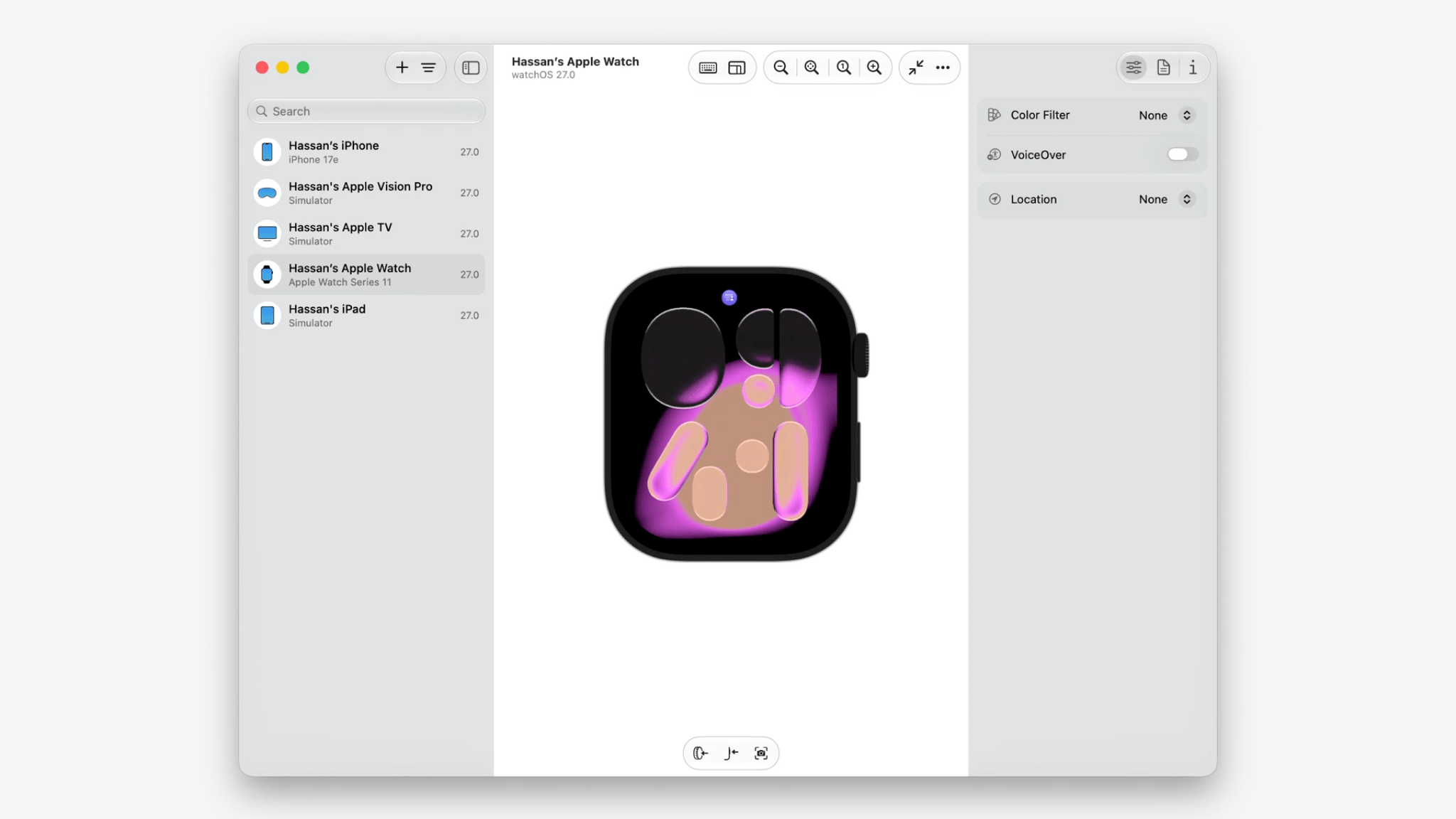
There are also some less favorable developments in Xcode. MacRumors reported that Xcode 27 is 30 percent smaller and will be Apple Silicon-only. Apps rebuilt with the new SDK will automatically adopt Liquid Glass as Apple removes support for opting out. Apple’s own Xcode guide focuses more on agents, Device Hub, localization, and Instruments. These details are therefore worth considering as developer-impact notes rather than the official framing.
For teams building serious Apple apps, the practical implications remain testing, profiling, localization, and verification. Xcode 27 aims to consolidate these processes.
6. SwiftUI gets practical upgrades for documents, toolbars, data flow, and performance
SwiftUI’s WWDC26 updates are less dramatic than the AI announcements but are the kind of incremental changes developers will find beneficial over time.
Apple’s SwiftUI guide highlights a new Document API, expanded toolbar controls, reorderable containers, presentation updates, AsyncImage caching, lazy initialization for classes stored in @State, and build-time improvements through changes to ViewBuilder, now exposed as ContentBuilder.
Some of these updates are necessary for apps that have grown beyond simple screens. Toolbars are a good example. Once an app runs across iPhone, iPad, and Mac, toolbar behavior becomes a significant design and engineering challenge. Developers must decide which actions remain visible, which move into overflow, and which remain pinned when space changes. New toolbar APIs such as visibility priority and overflow controls are practical because they address this issue directly.
The Document API updates are also noteworthy. Apps that work with real documents often require asynchronous reads and writes, progress reporting, and more control over creation flows. SwiftUI has been steadily expanding into areas that were previously more comfortable in AppKit or UIKit. Document workflows are one of those areas where small API improvements can remove a surprising amount of custom code.
AsyncImage caching may seem minor, but it also reduces accidental bad behavior. If an image-loading view respects HTTP caching by default, developers get a better baseline without writing a custom loader too early.
The broader point is that SwiftUI is still maturing into a framework for large applications, not only for fast prototypes. The AI announcements will receive more attention but many teams will spend more time with these SwiftUI changes than with a new model API.
7. App Store updates make distribution more asset-heavy and more operational
WWDC is typically considered a developer API event. However, Apple’s App Store guide introduced several updates that impact how teams package, market, and operate apps.
Apple introduced App Store-related tooling for richer visual assets, product page previews, personalized collections, and an Asset Library for managing store assets. It also highlighted new workflows for In-App Purchase submission, subscription configuration, game offers, StoreKit support for Unity, and Managed Background Assets.
Distribution is a crucial aspect of app development, even when it appears distant from code. A team can develop a feature effectively but still spend time preparing screenshots, previews, localized store assets, subscription metadata, in-app purchase review material, and promotional content across regions and platforms.
The Asset Library direction is particularly practical. As App Store pages become more visual and personalized, teams require a more efficient method for managing screenshots, videos, and other creative assets without turning release week into a file management exercise.
For games, Apple also announced a StoreKit plug-in for Unity, a Steam Asset Converter, and improved use of Background Assets. These updates demonstrate Apple’s efforts to reduce the friction for game developers who already have existing pipelines outside its ecosystem.
Developers should also be aware of policy-adjacent changes. Apple has deprecated On-Demand Resources with iOS 27, iPadOS 27, tvOS 27, and visionOS 27, with Managed Background Assets positioned as the newer path. The App Store guide also describes new Time Allowances and upcoming App Store Connect questionnaire requirements regarding social media capabilities, including July 2026 and September 2026 milestones.
These changes are not only administrative. If an app has social features, child-safety requirements and age-rating answers may affect its categorization and management by the system.
The rest of WWDC26 points in the same direction
The seven updates above are the most prominent developer signals from WWDC26 but are part of a larger platform update.
Apple also highlighted updates to Image Playground, including a new generative model running on Private Cloud Compute and broader API access for apps. Visual Intelligence received developer guidance on defining entities, processing images, returning multiple result types, and connecting visual results to direct actions. The company also pointed developers to Core Spotlight work for LLM search and app content discovery.
Outside the main app development path, Apple also advanced games and spatial tooling. StoreKit support for Unity, Background Assets improvements, Steam Asset Converter, RealityKit, Spatial Preview, and Reality Composer Pro all indicate Apple’s desire for Mac, iPad, Apple TV, and Vision Pro to be more credible targets for teams that already ship elsewhere.
This also has a compute story. MLX, Core AI, games, spatial apps, and high-performance media workflows all make more sense when Apple Silicon is considered the machine developers build on, test on, and eventually ship to. This is not the primary path for every iOS app team but is becoming a more visible part of Apple’s developer pitch.
iOS 27, iPadOS 27, macOS 27, watchOS 27, tvOS 27, and visionOS 27 also saw design and platform updates. These improvements include visual polish, compatibility work, and the ongoing effort to ensure apps feel native on the next OS release.
The broader pattern is more significant than any single announcement. Apple is integrating AI into the platform, with models being only one aspect. App entities, intents, local indexes, testing frameworks, privacy boundaries, evaluation workflows, and the app’s UI also play a crucial role.
Developers do not need to implement every Apple Intelligence feature this year. A more valuable exercise is to identify where the boundary between their app and the system is becoming increasingly blurred. Siri, Spotlight, App Intents, Foundation Models, Core AI, Xcode agents, and App Store metadata are all becoming part of the same developer interface.
For teams already deeply embedded in the Apple ecosystem, WWDC26 provides an opportunity to audit their app from a new perspective: what does the system know about their app, what can it safely do with that knowledge, and where would AI actually enhance the workflow rather than simply add another button?
Member discussion