
Best LLMOps tools in 2026: Practical options for reliable LLM applications

LLMOps is often described as "MLOps for LLMs." That is a decent shortcut, but it misses where most of the work actually happens.
Most teams building with large language models are not training foundation models from scratch. Most of their day-to-day work involves integrating model APIs into products, changing prompts, passing user context around, adding retrieval, calling tools, and trying to keep the whole thing from becoming hard to debug.
Deploying or calling a model is the easier part. The complications show up after that call.
These complications can vary from retries, prompt modifications and unsuccessful retrievals to missing traces, fallback models and costs that only become visible later.
That is where LLMOps tools come in.
Start with the part of your LLM application you trust the least.
What are LLMOps tools?
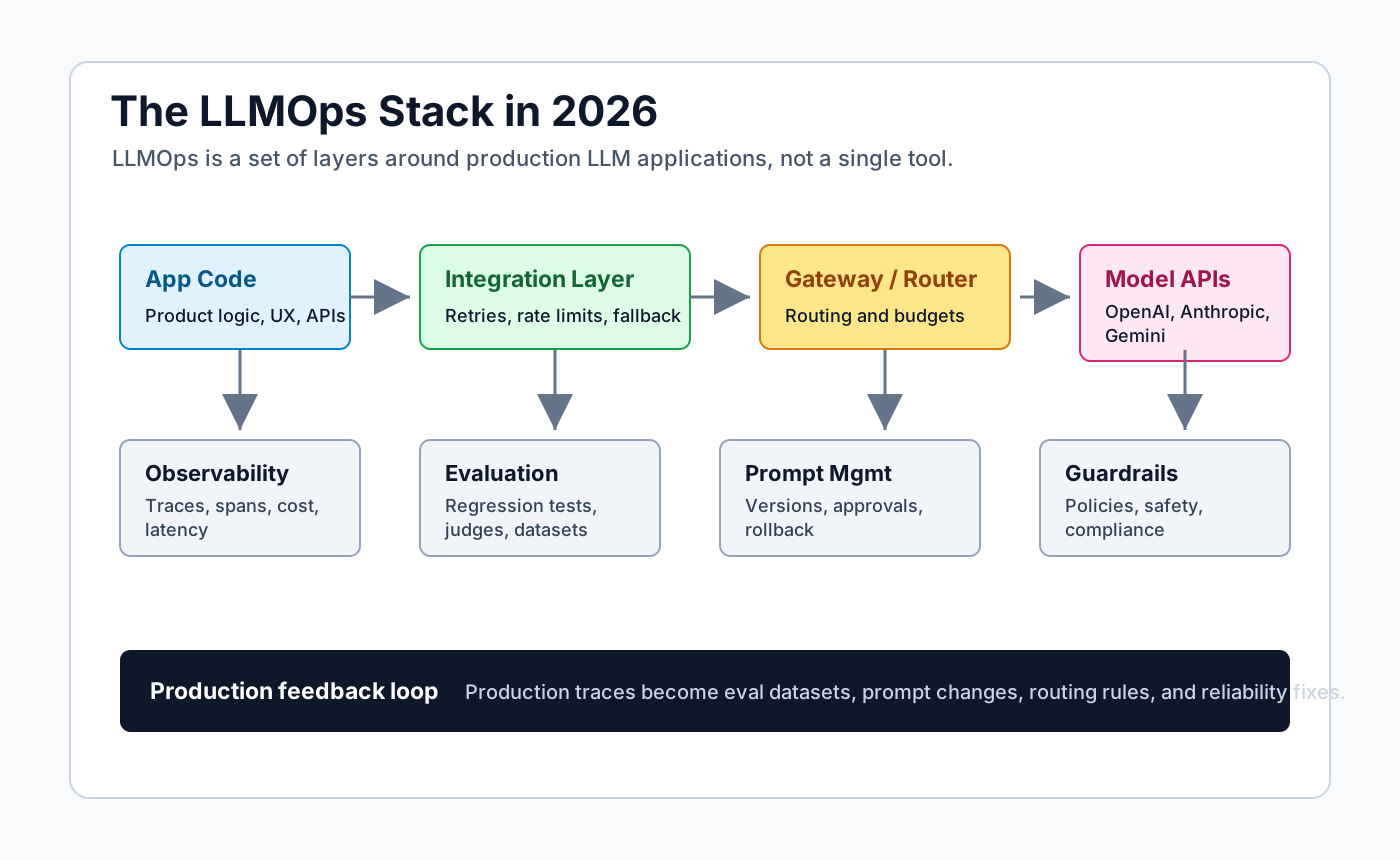
LLMOps can be loosely defined as the work happening around the model call.
When calling model APIs, the application still has to decide which prompt to send, which context to attach, which tools the model can call, what should be logged, and what happens when the answer is not good enough. This is usually where the production work can pile up.
Some LLMOps tools are integrated into the application, while others operate in front of model providers. Some mostly store traces, evaluation cases, prompt versions or human feedback. These categories overlap, which is acceptable as real stacks are not always neatly diagrammed.
This is also where LLMOps differs from regular MLOps. MLOps typically prioritizes training data, model versions, deployment, monitoring and retraining. In contrast, LLMOps focuses on the operational aspects of a request including the prompt, retrieved chunks, tool calls, fallback logic, latency, cost and the acceptability of the final answer.
How to choose LLMOps tools
Choosing LLMOps tools usually starts with the problem that is already visible.
If model calls fail with a spike in traffic, the problem may be the call path. Timeouts, retries, rate limits, or an unexpected fallback behavior can be caused by a faulty integration or a gateway problem, and may not be an eval issue.
If answers are bad, checking the traces may be more effective before changing the prompt. The prompt itself may be correct but the retrieved context may be weak or a tool call may have failed. Retrieved chunks can cause bad answers in RAG apps when the chunks are stale, too broad, or not related enough to the question.
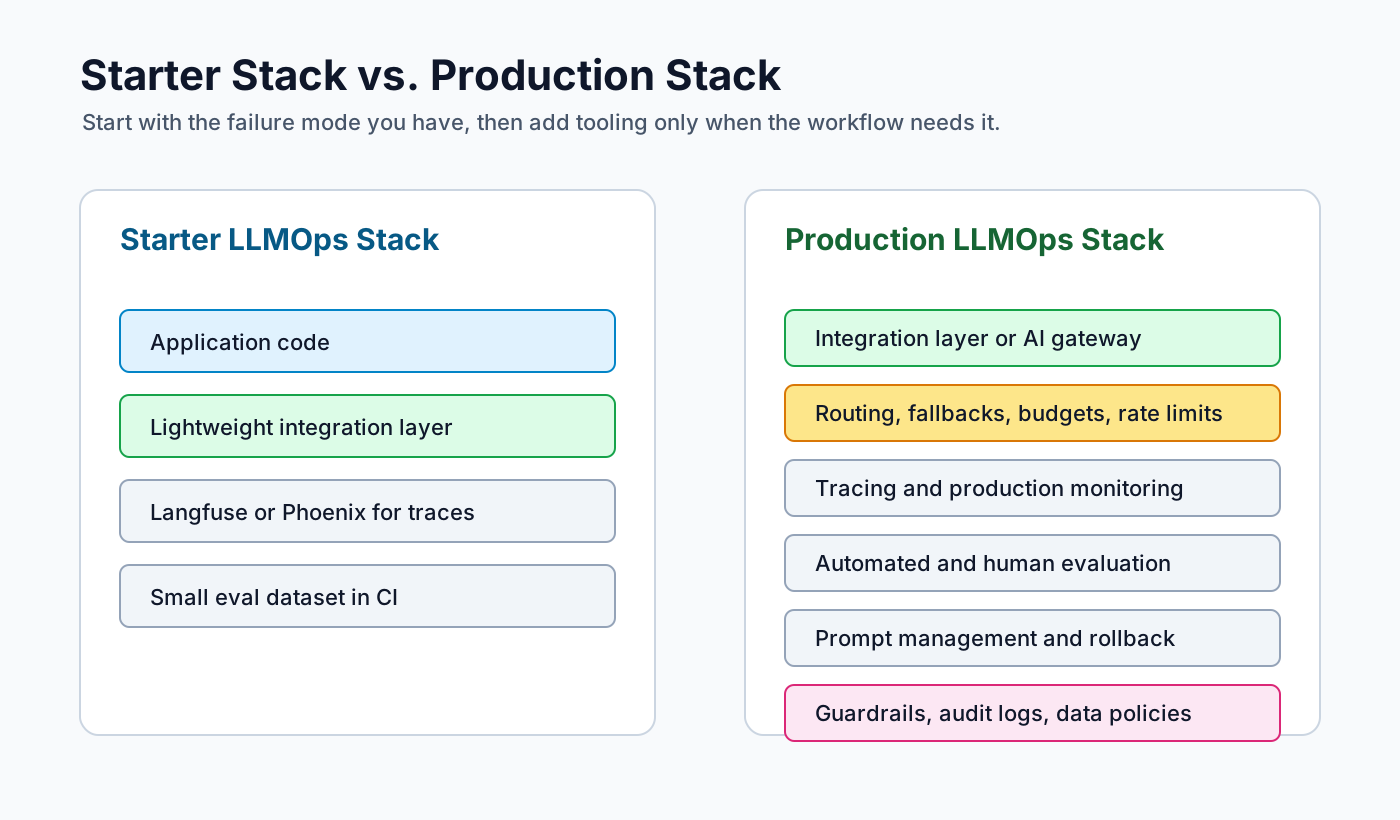
The first LLMOps stack can be small. It may be enough to have a model-calling layer, some traces, a few eval cases, prompts in version control, and basic cost tracking to start.
More pieces can come later. A gateway may make sense when several apps call models. Prompt management matters when more people edit prompts. Guardrails may come in when the output risk is higher.
Serving tools are a separate case. They matter only if the team is actually running models, not just calling hosted APIs.
LLM integration and orchestration tools
This layer primarily concerns the tools that call models, switch providers, stream responses and construct multi-step workflows. It becomes useful when model calls are no longer a single request in a single location.
1. Vercel AI SDK
Vercel AI SDK is usually a web-app choice. It fits cases where the model response is part of the user interface, such as chat, autocomplete, or streaming answers.
Streaming is the obvious use case. Provider abstraction and structured output are also useful, particularly when the application should not be overly concerned with the specific provider behind the response.
Rate limits, fallback behavior and circuit breakers still require a separate plan.
2. LiteLLM
LiteLLM is useful when the team does not want every app to know every provider API.
It provides teams with an OpenAI-compatible interface across multiple model providers and is often used as a proxy or shared provider layer. This is beneficial when model choice is frequently changing or when several applications require access to the same providers.
Teams use LiteLLM to keep provider switching and model routing away from the product code.
3. LangChain
LangChain is one of the more established and widely recognized frameworks for building LLM workflows. It has a large ecosystem around chains, tools, integrations, and agents.
It may be more than what a simple model call needs. LangChain starts making more sense when the workflow has multiple steps, tool calls, external systems, or state that needs to move between parts of the app.
4. LangGraph
LangGraph is designed for stateful agent workflows. It becomes relevant when an agent has branches, retries, human approval, memory or long-running state.
This is typically not necessary for a simple chat wrapper. It is more pertinent when the control flow is integral to the product. Tracing with LangSmith may be useful in this context as agent failures often occur before the final answer.
5. LlamaIndex
LlamaIndex is most beneficial when retrieval is the core function of the application.
If the primary challenge is integrating private or domain-specific data into the prompt, a retrieval-focused framework may be more effective than a general agent framework. LlamaIndex provides data connectors, indexing, retrieval workflows, and RAG pipelines.
6. Haystack
Haystack is another option for search, question answering and RAG applications. It has a longer history than many newer orchestration tools.
It may be more suitable when the application is primarily search or question-answering over a document corpus, rather than a general-purpose chat or agent workflow. Teams with existing search infrastructure may also find its pipeline style familiar.
7. Agno
Agno, formerly Phidata, is an open-source framework for agentic systems.
It focuses on agents, tools, memory, knowledge, and multi-agent workflows. It may be suitable for applications with a high agent load and teams seeking a lightweight alternative to some older orchestration stacks.
Agno is not a full LLMOps platform but rather a framework for agent-building.
8. ResilientLLM
ResilientLLM is a JavaScript/Node.js library with TypeScript support. It provides reliable LLM calls from application code.
It is suitable for Node.js teams that do not want every route or worker to implement its own provider error handling.
The project is smaller so it is advisable to review release activity, the issue history, the license and provider coverage before using it in a critical path.
LLM observability tools
Observability tools are mainly there to show what happened during a model request.
Normal application logs may have the final response but not the full context around it. The prompt, retrieved context, tool calls, token usage, latency and cost may be missing, and one of those details can be the actual source of the issue.
9. LangSmith
LangSmith is commonly used by teams already working with LangChain or LangGraph. It provides traces, datasets, evaluations and debugging tools for LLM applications.
For agent workflows, this matters because the problem is not always visible in the final answer. The issue may be in an earlier tool call, a branch that went the wrong way, or a step that used weak context.
10. Langfuse
Langfuse is an open-source LLM engineering platform. It covers tracing, prompt management, datasets, evals, experiments and human annotation.
It may be suitable when self-hosting matters or when prompts, traces and evals need to stay in one place. This can be relevant when production traces include customer messages, internal documents, or other data the team does not want scattered across tools.
11. Arize Phoenix
Arize Phoenix is an open-source tool for LLM observability, tracing and evaluation. It also leans into OpenTelemetry and OpenInference.
Phoenix may be useful when open standards matter. It can also work for teams that want to inspect traces, run evals and debug RAG workflows without starting with a large enterprise deployment.
Arize AX is the larger enterprise platform around similar production workflows.
12. Helicone
Helicone is focused on request logging, cost tracking, latency analysis, caching and provider-level visibility.
It can be useful before the team has a larger observability setup. The common questions are usually basic: which model is being used, where latency is coming from, and why the bill changed.
13. W&B Weave
W&B Weave brings LLM tracing and evaluation into the Weights & Biases ecosystem.
It may fit teams that already use W&B for ML experiments. Existing habits matter here. A tool the team already opens every day has some advantage when prompts, datasets and model experiments need to be compared over time.
14. Comet Opik
Comet Opik is Comet's open-source platform for LLM evaluation and observability.
It may be suitable if the team already uses Comet, or if an open-source option that connects evals and traces is preferred. Opik is more relevant when quality tracking and experiment comparison are part of the same workflow.
LLM evaluation tools
Evaluation tools are used to check whether model outputs are acceptable for a given task.
They are not a full replacement for human review. Still, they can help when prompt edits, model changes or retrieval updates need to be checked against known examples.
In many teams, the useful eval cases come from production traces. A bad answer, a missing citation, a wrong tool call, or a weak retrieval result can become a case that is tested again later.
15. Braintrust
Braintrust is built around evaluation workflows. It helps teams create datasets, run experiments, compare prompts, score outputs and monitor quality.
It may be suitable when prompt or model changes need regression testing. It can also be useful when production traces are expected to become future eval cases.
16. DeepEval
DeepEval is a developer-focused evaluation framework for LLM applications. It is usually closer to the codebase than a managed evaluation platform.
It may be suitable when engineers want to write evals that can run locally or inside CI/CD pipelines. This can work well for teams that already treat LLM quality checks as part of the test suite.
Prompt management tools
Prompt management tools keep prompts versioned and easier to review.
This may matter when more than one person edits prompts, or when prompt changes affect support quality, compliance, revenue, or user trust.
17. Vellum
Vellum is a managed platform for prompt management and LLM workflow development. It enables teams to version prompts, test changes and manage production workflows.
It is suitable for teams that require prompt and workflow operations within a product interface and can also be useful for non-engineers to review or adjust prompts without editing application code directly.
18. Langfuse prompt management
Langfuse also supports prompt management. This may be useful if traces and evals are already managed in Langfuse.
When a bad answer happens, the prompt version can be viewed with the trace and eval result. The active prompt version then becomes easier to check during debugging.
AI gateway tools
AI gateways sit between the application and model providers.
They are used for routing, key management, budgets, rate limits, fallback, logging and policy control. This becomes relevant when more than one app or team is using the same model providers.
19. Portkey
Portkey is an AI gateway that manages multi-provider routing, observability, guardrails and access control.
It is suitable for applications where multiple services share model access. A central gateway can manage provider handling, rate limits and governance outside individual product services.
20. LiteLLM proxy
LiteLLM also fits in the gateway category when used as a proxy. It can normalize provider access behind an OpenAI-compatible API.
This may help when provider flexibility is the main requirement. It can also be useful when teams want to change models without rewriting application code. In that setup, provider configuration can live outside individual services.
Guardrails and safety tools
Guardrails are typically implemented after the failure mode is identified.
Occasionally the issue arises from a format mismatch. The model returns text when the application requires JSON. Alternatively, the problem may be content-related, such as PII, unsafe advice, prompt injection or an answer that should not be displayed directly to the user.
21. Guardrails AI
Guardrails AI helps validate and constrain LLM outputs using structured validation and policy rules.
It is mainly used when the response has to follow a predictable structure, such as JSON or a typed schema. It can also be used when the response needs to be checked or corrected before it reaches the user.
22. NeMo Guardrails
NeMo Guardrails is NVIDIA's open-source toolkit for adding guardrails to conversational AI systems.
It is more focused on conversation behavior. NeMo Guardrails may be suitable when the assistant needs defined paths, safety rules or a specific role during the conversation.
23. Lakera Guard
Lakera Guard focuses on prompt injection and LLM security use cases. Lakera was acquired by Check Point in 2025, so enterprise buying, packaging or support may now involve Check Point.
It may be relevant when prompt injection, malicious inputs or security review are central concerns. This may matter less for small internal tools. Public-facing assistants usually need a more careful review.
RAG and vector search tools
RAG heavily relies on the retrieval layer.
When answers appear incorrect, it is better to verify the retrieved data before changing the model. The retrieved chunks may be outdated or the metadata filter may be too permissive. The ranking may also return nearby text, and not the text needed for the question.
24. Qdrant
Qdrant is an open-source vector database with managed and self-hosted options.
Qdrant is usually considered when the team wants more control over the search layer. Metadata filtering and self-hosting are common reasons to look at it.
25. Chroma
Chroma is a developer-friendly open-source vector database.
It is commonly used for prototypes, local development and smaller RAG projects. Chroma can be useful when the team is still testing chunking, embeddings and retrieval behavior.
26. Pinecone
Pinecone is a managed vector database for production RAG applications.
It is more of a managed infrastructure choice. The team does not have to operate vector search directly, but scaling, availability and index operations move into a paid service.
27. Weaviate
Weaviate is a vector database that supports hybrid search and flexible deployment options.
Weaviate is suitable for cases where vector similarity is not enough by itself. Hybrid search can matter when names, IDs, product codes or exact terms still carry a lot of weight.
Serving and deployment tools
Hosted model APIs usually keep this problem outside your codebase. If you run open-weight models, it becomes part of your LLMOps stack.
Only spend time here when you actually plan to operate inference. Hosted APIs may be enough for many products. Serving tools start to matter when privacy, latency, or cost makes the team run a model itself.
28. vLLM
vLLM is a popular inference engine for serving open models efficiently.
vLLM is normally considered when GPU throughput starts to matter. Batching, memory use, concurrency and latency become real concerns once the model is served by the team. If the app only calls hosted APIs, this layer can be skipped.
29. BentoML
BentoML helps teams package, deploy, and scale AI services.
BentoML is closer to the service packaging side. It helps when a model has to be exposed like an internal service, deployed repeatedly, and operated with the rest of the backend. It does not fix bad prompts or weak retrieval.
30. Hugging Face Inference Endpoints
Hugging Face Inference Endpoints are managed endpoints for deploying models from the Hugging Face ecosystem.
They are convenient when your team already uses Hugging Face models and wants managed deployment. This can be a simpler route than building your own serving layer when the model already lives on Hugging Face.
31. Ray Serve
Ray Serve is a scalable model-serving library built on Ray.
Ray Serve is usually for teams that already need Ray, Python-native serving or distributed inference logic. It gives more control than a hosted endpoint, but there is more infrastructure to own. It should be chosen for that control, not because every model needs a serving framework.
Open source vs SaaS LLMOps tools
The choice between open source and SaaS should be data-driven rather than a tooling preference.
Prompts and traces can include customer messages, internal documents, account details, support history or source code. If this data cannot be transferred from your infrastructure, self-hosting becomes more justifiable. However, self-hosting also means that an organization is responsible for upgrades, backups, access control and the management of service outages.
SaaS tools are not automatically careless here. Some have good redaction, retention controls, access controls and audit logs. The point is to check these things before production traces start flowing into the tool.
The questions are plain enough. What is stored? For how long? Can prompts be redacted before storage? Can vendor support see traces? Are traces used for training? The answer should be clear enough for a security review, not only for a product page.
Common mistakes when choosing LLMOps tools
Treating logs as evals
Logs provide a record of a request but do not always indicate whether the result was acceptable. A team usually needs both logs and evals.
Starting with a platform before naming the problem
It is easy to start with a large platform because the category feels important. But the first question is still simpler. Are model calls failing? Is retrieval weak? Are prompt edits disrupting established behavior? The tool should address these issues.
Testing only happy paths
Useful evaluation cases are often the most challenging. These include scenarios with missing context, ambiguous user intent, tool errors, unsafe requests, lengthy conversations and provider failures. They are closer to production than a clean demonstration prompt.
Ignoring cost until the bill arrives
Cost needs to be visible before the invoice arrives. A monthly token total can hide which workflow, model, feature, tenant or user tier is causing the increase.
Sending sensitive data everywhere
Prompts and traces can contain customer data, internal documents, secrets and business context. Redaction and retention policies are not only compliance details here.
Final rule of thumb
The simplest way to think about LLMOps tools is to start with the part of the LLM app that is already causing production issues.
If the reasons for incorrect answers are unclear, add traces. If prompt modifications disrupt older behavior, include a few evaluation cases. If provider failures are difficult to trace, place routing and fallback mechanisms in a visible location.
The stack does not need to appear complete on day one. It only needs to help the team identify the next failure, test a fix and recover faster.



Member discussion