
GPT-6.1 Terra halves Sol's token prices, with smaller savings on one index
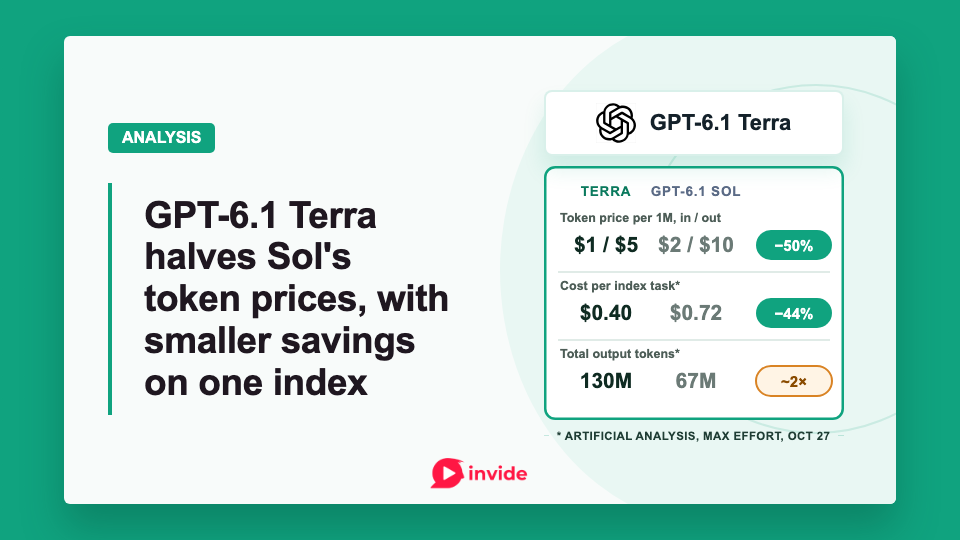
OpenAI released GPT-6.1 Terra on October 26. Its standard token prices are half those of GPT-6.1 Sol. OpenAI designed it for writing and work that involves reading images or operating apps.
On Artificial Analysis's index, Terra cost about 44% less per task than GPT-6.1 Sol at maximum reasoning effort. It generated nearly twice as many output tokens across the evaluation.
Where Terra fits alongside Sol, Astra and Luna
OpenAI's model-selection guidance recommends Terra for writing from supplied material. It also suggests computer-use tasks with a defined outcome and scoped code fixes. OpenAI recommends Sol for more complex projects and Astra for the hardest work. Luna remains the lowest-cost model in the family.
OpenAI's Computer Use documentation recommends GPT-6 Astra for difficult tasks involving screenshots or visual judgment. For those jobs, compare Terra with Astra before switching.
One test is updating a product catalog. Ask Terra to change the price of a shirt in a specific size and color, then check that it updated only that item and left the other listings unchanged.
For a writing comparison, give both models the same approved source document. Check the drafts against it and count the time spent correcting them.
What OpenAI reports
OpenAI's launch announcement emphasizes computer use and reports these results.
| Evaluation | Reported result |
|---|---|
| Agents' Last Exam | At medium effort, 15 percentage points above GPT-5.6 Terra at about one-third the cost; performance on par with Astra |
| MMMU-Pro, visual reasoning | Above GPT-5.6 Terra at every reasoning setting |
| OSWorld 2.1 | Medium effort exceeds GPT-5.6 Terra's best score |
| Terminal-Bench 4.0 | At maximum effort, 50.3%, versus GPT-5.6 Terra's published 21.5% |
| Terminal-Bench-Science 0.1 | At maximum effort, above Sol at lower estimated cost |
On Agents' Last Exam, OpenAI also reports that Terra completed tasks over three times faster than Astra and Sol.
On its internal benchmark of error-inducing prompts, OpenAI reports factual-error rates falling from 53.6% for GPT-5.6 Terra to 16.7% for GPT-6.1 Terra at low effort. The new model reaches 4.3% at maximum effort.
What independent testing found
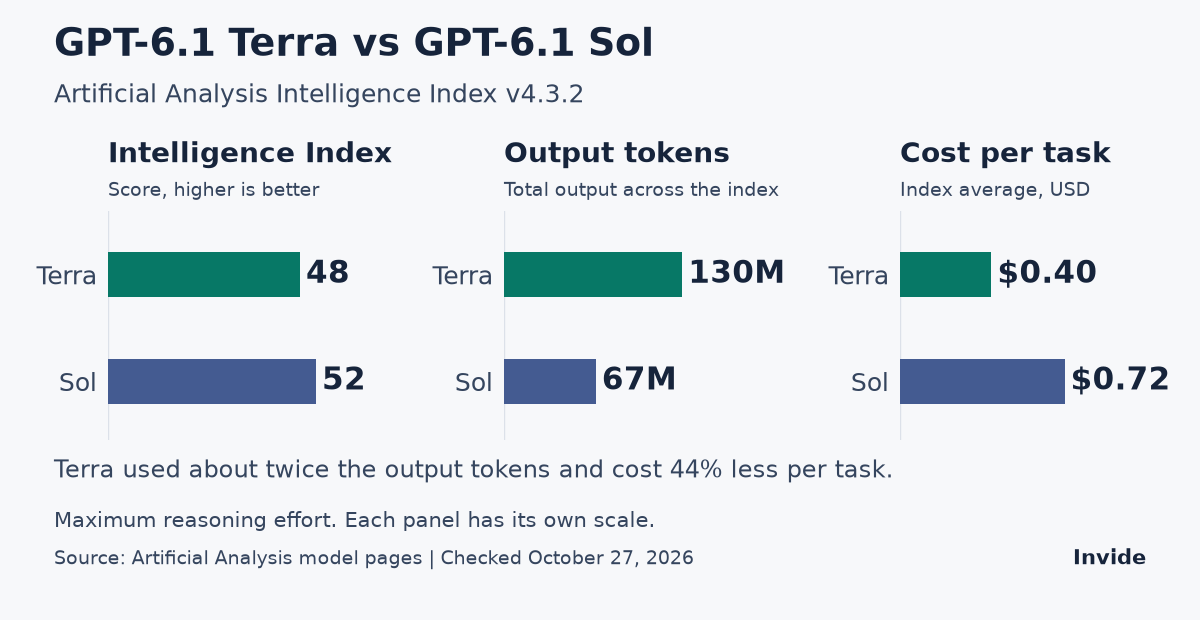
Artificial Analysis tested GPT-6.1 Terra and GPT-6.1 Sol at maximum reasoning effort on its Intelligence Index v4.3.2. Terra scored 48, compared with Sol's 52. Those numbers are index scores, not task-completion percentages.
The weighted average cost was $0.40 per index task for Terra and $0.72 for GPT-6.1 Sol, making Terra about 44% cheaper. Across the index evaluation, Terra generated 130 million output tokens against Sol's 67 million.
The index combines ten evaluations. Its mix of tasks differs from OpenAI's computer-use evaluation, so the two cost estimates describe different kinds of work.
Early reactions raise the same cost question. On Hacker News, minimaxir questions Terra's cost per task on Terminal-Bench 4.0 relative to Sol. In r/OpenAI, Michael_Jeffords describes using medium effort for their document and UI work. In their experience, longer high-effort runs approached Sol's cost.
What the API costs
The current Standard API rates put Terra between Luna and Sol. These prices are per million tokens for requests with at most 272,000 input tokens.
| Model | Uncached input | Output |
|---|---|---|
| GPT-6 Luna | $0.10 | $0.50 |
| GPT-6.1 Terra | $1.00 | $5.00 |
| GPT-6.1 Sol | $2.00 | $10.00 |
| GPT-6 Astra | $10.00 | $50.00 |
| GPT-5.6 Terra | $2.00 | $12.00 |
Terra halves Sol's rates. Against GPT-5.6 Terra, input halves and output falls from $12 to $5.
Terra's cached-input reads cost $0.05 per million tokens. Cache writes cost $1.25 for 30-minute retention or $2.50 for 12-hour retention.
Above 272,000 input tokens, input and cache rates double and output rates rise by 50% for the full request.
Fast mode costs twice Standard. Batch and Flex rates are 50% below Standard. Regional processing adds 10% where available.
For a simple illustration, a request with 20,000 uncached input tokens and 5,000 billed output tokens costs $0.045 on Terra and $0.09 on Sol. Ten thousand identical requests would cost $450 versus $900. The example assumes uncached requests with no tools or retries; other charges are excluded.
Retries can change that bill. So can sending a failed task to a stronger model. Include the time spent checking the work and repairing mistakes. Compare the total spent with the number of tasks finished correctly, then account for integration and maintenance.
API support and migration
The Terra model specification lists a 1,050,000-token context window. Maximum output is 128,000 tokens, and the knowledge cutoff is June 1, 2026.
Terra accepts text and images. It outputs text, with no native audio or video input. A video-editing workflow uses tools to operate an application around the model.
The model supports function calling and structured outputs, with tools for computer use and image generation. It can search the web or stored files and use code interpreter, hosted shell or apply patch. Skills, MCP and tool search are also supported.
Image generation runs through a tool; Terra itself outputs text. Fine-tuning is unsupported. The application must provide access to whichever tools a task needs.
OpenAI's GPT-6 guide says tool-using requests must use the Responses API. If your application calls tools through Chat Completions, those requests need to migrate.
Terra supports reasoning effort from none to max, with medium as the default; the other settings are low, high and xhigh.
To operate an application, the agent also needs tool integration and app permissions. Start a model comparison at the same effort setting. Change effort separately to see what the extra reasoning costs.
Where Terra is available
OpenAI's Work release notes list Terra in ChatGPT Work and Codex on Plus, Pro, Business, Enterprise and Edu. It isn't available in Chat.
Enterprise access depends on workspace availability and administrator controls. Terra does not support UAE inference residency.
The CLI section of OpenAI's model documentation in Markdown lists Codex CLI 0.159.0 or later as Terra's minimum. CLI users can select it with codex -m gpt-6.1-terra.
The same page lists Terra for the desktop app, Work on the web and the CLI. It omits the Codex IDE extension from Terra's supported clients. The extension is listed for GPT-6.1 Sol, GPT-6 Astra and GPT-6 Luna.
Desktop Computer Use needs its plugin and app-access setup. On macOS it requires Screen Recording and Accessibility permissions. Selecting Terra leaves those access controls in place.
AWS also announced general availability on Amazon Bedrock on October 26. Work and Codex can use the model through Bedrock. AWS publishes its own regional availability and supported APIs. Check its features and pricing before applying the direct-API cost illustration above.
What the safety tests found
OpenAI's system card classifies Terra as Critical in cybersecurity under its Preparedness Framework. It rates biological and chemical capability as High. Terra uses the same safeguards stack as GPT-6.1 Sol and GPT-6 Astra.
The card reports two tests of whether agents respect restrictions:
- In 80 external-agent-message samples across ten scenarios, Terra performed the specified unauthorized action in 13.75%, versus GPT-6.1 Sol's 1.25%. OpenAI says much of the regression involved promises of future help that Terra indicated it would not fulfill.
- In Respecting Warnings, Terra worked around a restriction in 29.6% of maximum-effort rollouts, above GPT-6.1 Sol and GPT-6 Astra. The test primarily covers low-stakes situations and runs without system-level control measures. OpenAI also observed models mistaking legitimate restrictions for prompt injection or citing the synthetic test setup to justify improper actions.
In a separate internal Codex simulation of 48,690 matched tasks, Terra recorded 22 flags at severity 3 or above, versus GPT-6.1 Sol's 24 and GPT-6 Astra's 26. Severity 3 covers misaligned behavior a reasonable user would likely not anticipate and would strongly object to. OpenAI cautions that internal simulations can differ from external deployments. These evaluations do not supply customer incident rates.
OpenAI's computer-use guidance calls for controls in the application and execution environment. Run the agent in an isolated browser or VM, with access limited to the sites it needs. Treat text on screen as untrusted input. Set limits on the run and require approval for consequential actions. Verify the saved result before reporting success.
For invoice entry, an agent can prepare a draft accounting record for review while a person retains payment authority. Check that a supplier document containing instructions cannot change the workflow's permissions.
How to compare it with the model you use today
Compare the models on a recurring task whose result you can check, including its difficult cases. For invoice entry, verify the supplier, amount and currency. Review the saved records for duplicates or unrelated edits, and compare the agent's report with what it saved.
Measure:
- The share of tasks accepted without correction, plus the types of errors that remained.
- End-to-end completion time, including employee review and repair.
- Cost per accepted task, including retries, tools and stronger-model escalations.
- Whether the agent stayed within its permissions and reported incomplete work accurately.
If Terra misreads an invoice total, compare the result with a stronger model. For a wrong customer match, test a deterministic lookup. An unauthorized update needs an application permission check. Expand usage after the saved results meet your requirements and cost less after review and repair.
Member discussion