
Node2Shell explained: who is affected and how to patch Node.js
TL;DR
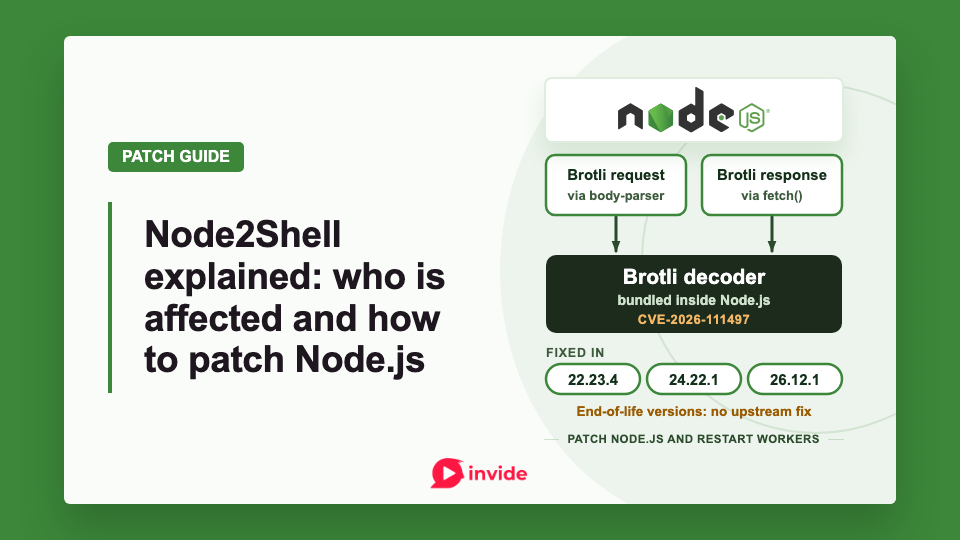
- CVE-2026-111497, called Node2Shell in Imperva's analysis, is a flaw in Node.js's bundled Brotli decoder. Decoding attacker-controlled Brotli data can cause crashes, memory disclosure or remote code execution.
- Install Node.js 22.23.4, 24.22.1 or 26.12.1, or a newer patched release in your supported line. Restart or replace every process using the old runtime. Node.js 20 and other end-of-life lines get no upstream fix; move to a supported, patched line such as 22 or 24.
- Check whether Express 5 or body-parser 2 decompresses incoming requests, whether your application reads Brotli responses through
fetch(), and whether any code calls the Brotli decompression functions directly. - Imperva's lab tests demonstrated code execution after multiple attempts. The primary sources checked had not confirmed exploitation in the wild as of 26 October 2026.
Node.js released the fixes on 21 October 2026 and rates the Brotli flaw High.
In this guide:
- Affected and fixed Node.js versions
- What happened inside the Brotli decoder?
- How can the flaw reach your application?
- Find the runtime your application actually uses
- Apply the patch in your deployment
- What can you do while the update rolls out?
- What else did the October release fix?
- Does patching Node.js cover other Brotli users?
- Verify the deployment and investigate earlier exposure
- Frequently asked questions
Affected and fixed Node.js versions
These are the affected upstream release lines and their first fixed versions:
| Release line | Affected releases | First fixed release or action |
|---|---|---|
| Node.js 22.x | Before 22.23.4 | 22.23.4 |
| Node.js 24.x | Before 24.22.1 | 24.22.1 |
| Node.js 26.x | Before 26.12.1 | 26.12.1 |
| Node.js 20.x, 23.x, 25.x and other end-of-life lines | Treat as affected; no upstream fix in these lines | Migrate to a supported, patched line. |
Install the listed fix or a newer patched release in the same supported line. The Node.js security advisory says end-of-life versions are always affected when a security release occurs.
Node.js lists 22 and 24 as LTS and 26 as Current on the release schedule checked for this guide. For production, its recommendation is an Active LTS or Maintenance LTS release. An application that already runs a supported major version can take its security patch without changing major versions.
The table describes upstream binaries. Distribution packages can carry backported fixes under older-looking versions. For distribution, custom or commercially maintained builds, verify the provider's patch assessment and, for packages, the complete revision. Trail of Bits' detection evidence explains why both the package origin and the binary loaded by the application matter.
All guidance below was checked on 26 October 2026. The versions above are fixed-version minimums for this vulnerability; check for newer security releases when you perform the update.
What happened inside the Brotli decoder?
Brotli is a compression format used for HTTP content, among other data. During decompression, the decoder changes how it interprets blocks within a stream. The vulnerable code mishandles an invalid block transition and can continue processing when it should reject the stream.
The upstream Brotli patch makes that invalid transition produce a format error and propagates the failure through the decoding code. Node.js says the decoder kept appending bytes to an eight-byte internal buffer, writing past its end. Memory corruption in native code can affect the process even when the application itself is JavaScript.
Imperva's Ron Masas reports code execution against the official, unmodified Node.js 24.22.0 Linux arm64 image. The team tested applications that read a response using built-in fetch(), as well as applications that used Express and body-parser middleware to decompress incoming request bodies. The same inputs failed on Node.js 24.22.1.
Execution required multiple attempts in Imperva's tests. Its results cover the tested Linux arm64 build and application configurations; exploit reliability on other builds remains unverified.
Google, the CVE assigning authority, scores the flaw Critical at CVSS v4.0 9.2. Red Hat rates it Important, CVSS v3.1 8.1, citing exploitation requirements and platform hardening. The scores use different CVSS versions. Red Hat says there is no public, reliable RCE proof of concept.
The primary sources reviewed for this guide did not confirm attacks in the wild as of 26 October. Check current vendor advisories when assessing a live deployment.
How can the flaw reach your application?
Start by checking services that decompress Brotli data that an attacker can supply or change. Check both the requests your service receives and the responses it fetches from other servers. Also check any code that calls Brotli decompression functions directly.
Incoming compressed requests
Express 5 and body-parser 2 can decode Brotli request bodies before an application handler receives the parsed content. Developers may therefore invoke the decoder through an ordinary JSON parser without writing a Brotli call themselves. The body-parser documentation describes automatic inflation and the inflate option.
Imperva tested pinned configurations including Express 5.0.0 and 5.3.0, and body-parser 2.0.0, 2.0.1 and 2.3.0. It did not test every intermediate release. These packages pass compressed request bodies to Node's decoder. The vulnerable code is in Node.js itself. A bare Node HTTP server does not automatically decode an incoming body just because its Content-Encoding says br.
For triage, locate where body parsing happens relative to authentication. If a parser runs first, an authentication check in a later handler cannot prevent that earlier decoding operation.
Responses fetched from another server
Built-in fetch() can decode a Brotli response when the application consumes it. Check URL importers, preview generators and crawlers if they fetch content from servers where an attacker can supply or change the response.
An inbound WAF cannot inspect every response that an application fetches elsewhere. Vercel explicitly identifies fetched responses as a path its inbound protection does not cover. A private worker that decodes untrusted Brotli responses with a vulnerable runtime still needs a patch, even without a public listening port.
For self-hosted Next.js, Vercel warns that image optimization does not block Brotli responses and directs operators to upgrade Node.js. Updating the framework alone leaves the runtime decoder unchanged.
Direct decompression and build jobs
Inspect uses of brotliDecompress(), brotliDecompressSync() and createBrotliDecompress(), including calls inside dependencies. Trace the source of the compressed bytes, such as uploads, stored objects or queue messages.
If Node.js only builds a static frontend, assess the build environment separately from the server delivering the generated files. Check whether the production host only serves generated files or also runs a Node.js server. The build job still needs review if it fetches or decodes untrusted content, and its runtime should receive the security update.
Likewise, creating Brotli-compressed responses is a different operation from decoding untrusted input. Having compression turned on does not mean your application decompresses data that an attacker can supply or change.
Find the runtime your application actually uses
Run this in the relevant host, CI job or container:
node -p 'JSON.stringify({node: process.version, executable: process.execPath, brotli: process.versions.brotli})'
Node's process API exposes these fields. The command shows which Node.js executable runs when you type node in that environment. Your application may use a different executable if it runs under another account, through a process manager or inside a container.
For evidence from the serving application, log the same values at startup through your existing internal logging system:
console.info('Node runtime', {
  node: process.version,
  executable: process.execPath,
  brotli: process.versions.brotli,
});
Check every replica and background worker after replacement. Keep this diagnostic in internal logs instead of adding a public endpoint.
To confirm that the runtime includes the fix, check its Node.js release or the vendor's patch record. The Brotli version string alone can mislead because the Node.js release notes describe a cherry-picked decoder fix. Running node --version after the update does not show whether servers that started before the update have restarted.
Apply the patch in your deployment
Hosts and developer machines
Update Node.js through the installation method that owns it. For an existing POSIX nvm installation, an explicit Node.js 24 example is:
nvm install 24.22.1
nvm use 24.22.1
node --version
Use your branch's fixed version, or a newer patched release. Update a pinned .nvmrc or CI version so the next checkout does not select the previous runtime.
nvm use changes the Node.js version selected in your current terminal. It does not change the version used by services that are already running or start through another executable path. Check the executable path configured for the service, then restart or replace the application through its process manager. Repeat for scheduled jobs and workers.
For operating-system packages, use the distributor's security update and verify its full package revision. For official Windows or macOS installers, install the appropriate patched Node release and relaunch applications that use that installation. Applications that bundle a private runtime need an update from their maintainer or a rebuilt bundle.
Updating Express, Next.js, npm or an application lockfile alone does not replace Node's bundled decoder.
Containers and Kubernetes
Change the Node base image to a fixed release. For a Node.js 24 image using the slim variant, the relevant Dockerfile line is:
FROM node:24.22.1-slim
Then rebuild your application image with a fresh base:
docker build --pull -t my-app:node-security-fix .
Docker documents that --pull checks for a newer base image. Disabling the build cache alone does not fetch one. If you pin a vulnerable exact tag or digest, change that reference first.
Inspect the resulting image before deployment:
docker run --rm --entrypoint node my-app:node-security-fix --version
Deploy the new image and replace the old containers. In Kubernetes, update the workload's image reference, follow the rollout and verify every replacement pod. Restarting pods against the same vulnerable image preserves the vulnerable runtime. Review each stage of a multistage build if both the builder and final application run Node.
Managed platforms, including Vercel
Read your provider's security bulletin to find out whether it updates Node.js for you, which version you need to select, and whether you must redeploy the application. Check whether the provider has patched the runtime as well as added rules to block incoming attacks.
Vercel's bulletin, checked on 26 October, says it deployed inbound WAF rules and was rolling out patched managed runtimes. It does not yet declare that rollout complete. For managed Node.js 22 or 24, Vercel handles patch versions without requiring a major-version setting change. Projects on Node.js 20 must select 22 or 24 and redeploy.
Self-hosted Next.js, external backends and images you build remain your responsibility. Verify the deployed runtime even when traffic passes through a managed frontend.
What can you do while the update rolls out?
Temporarily reject Brotli-encoded request bodies before they reach a vulnerable parser, where your application can tolerate that restriction. Red Hat recommends limiting untrusted Brotli decoding and restricting access to exposed services.
For body-parser, inflate: false rejects compressed bodies with an error carrying HTTP status 415 and type encoding.unsupported. The restriction also blocks gzip, deflate and, in versions that support it, zstd. Test legitimate clients and your error handler before deploying that change. Middleware placed after decompression runs too late to prevent the decoder call.
For outbound traffic, reduce access to untrusted destinations or suspend the affected fetching feature while you patch. Removing br from Accept-Encoding requests a different response format, but a hostile server can still send Brotli content. Inbound rules leave that response path open.
Treat these controls as temporary reductions in exposure. Complete remediation requires replacing the affected runtime or obtaining a documented vendor fix.
What else did the October release fix?
The release addresses ten named Node.js issues in total. Beyond Brotli, the official advisory lists:
| CVE | Severity | Problem | Supported lines affected |
|---|---|---|---|
| CVE-2026-105482 | High | DNS names truncated at NUL bytes | 22, 24, 26 |
| CVE-2026-105483 | High | TLS checking of fullwidth IP digits | 24, 26 |
| CVE-2026-106069 | High | TLS validation and connection disagree on an IP | 22, 24, 26 |
| CVE-2026-105481 | Medium | HTTP Agent accepts a premature response | 22, 24, 26 |
| CVE-2026-106072 | Medium | DNS certificate names authenticate noncanonical IPs | 22, 24, 26 |
| CVE-2026-106074 | Medium | Startup snapshots preserve cached random values | 22, 24, 26 |
| CVE-2026-106070 | Low | ZipFile returns content after failed header validation | 26 |
| CVE-2026-106071 | Low | Permission wildcard grants excessive filesystem access | 26 |
| CVE-2026-106073 | Low | realpathSync omits permission checks | 22, 24, 26 |
The per-branch release notes also record dependency and certificate updates. Even an application without a Brotli decoding path should take its supported branch's security release.
Does patching Node.js cover other Brotli users?
Each separately packaged decoder needs its own update. For adjacent services in the same deployment:
| Component | Fixed release or action | Scope |
|---|---|---|
Python Brotli package |
1.2.1 | Use the PyPI release matching the 1.2.1 fix named in Google's CVE record. |
Python brotlicffi package |
1.2.1.0 | Its PyPI changelog explicitly records the CVE fix through libbrotli 1.2.1. |
| Bun | 1.4.4 | Its release notes include Brotli security fixes. |
| Envoy | 1.40.0, 1.39.3, 1.38.6, 1.37.8 or 1.36.12, according to branch | The Envoy advisory limits exposure to deployments with a Brotli decompressor configured. |
For the underlying C library, Google's CVE record identifies affected releases starting at 1.0.3 and extending through 1.2.0, with branch-specific fixes in 1.0.10, 1.1.1 and 1.2.1. A rule that flags every version below 1.2.1 would incorrectly flag those patched older branches. Vendor packages and bundled copies need their own patch evidence.
PHP services need their own runtime update. Our PHP2Shell patching guide covers the separate PHP vulnerabilities disclosed on the same day.
Verify the deployment and investigate earlier exposure
After deployment, confirm the runtime version or vendor revision from the application context. Check the image reference or package inventory alongside startup logs, and make sure old replicas and workers have stopped. Exercise normal compressed-request handling and outbound fetching, then watch for application regressions.
Imperva recommends correlating unexpected process exits and decoder errors with application logs, the deployed runtime and the source of compressed data. Those events can guide investigation, but they are not reliable stand-alone evidence of exploitation. Investigate earlier exposure even if logs show no decoder errors.
If investigation finds evidence of compromise, preserve the relevant logs and artifacts, contain the affected workload and assess the credentials and data accessible to that process. A runtime patch prevents this decoder flaw from remaining available; it does not undo an earlier intrusion.
Record the patched package or image revision and runtime version for each deployment. Before closing the update, confirm that every serving replica and background worker has restarted on that revision.
Frequently asked questions
Am I affected if my code never calls Brotli?
You can be. Middleware or an HTTP client may decompress Brotli data that an attacker supplies, even if your own code never calls Brotli directly. Check whether your Express/body-parser configuration decompresses incoming bodies or your application reads Brotli responses through fetch(). See the exposure paths.
Does upgrading Express, Next.js or my lockfile fix it?
No. The vulnerable decoder is in Node.js; update the runtime used by your application. Follow the deployment-specific patch steps.
Does my WAF protect me?
Relevant rules can reduce exposure through inbound requests. They do not cover Brotli responses your application fetches from other servers. See the fetched-response path.
Is Node2Shell being exploited in the wild?
The primary sources checked had not confirmed in-the-wild exploitation as of 26 October 2026. Imperva reported laboratory code execution; see the evidence and its limits.
I updated Node.js. Am I done?
Confirm that every server, worker and container uses the patched runtime, including processes that were already running when you installed it. See deployment verification.
What should I do about Node.js 20?
Move to a supported, patched line, such as Node.js 22 or 24 LTS. Node.js 20 is end of life and receives no upstream fix. See the affected and fixed versions.

Member discussion