
What is the Pi coding agent, and how does it work with local models?
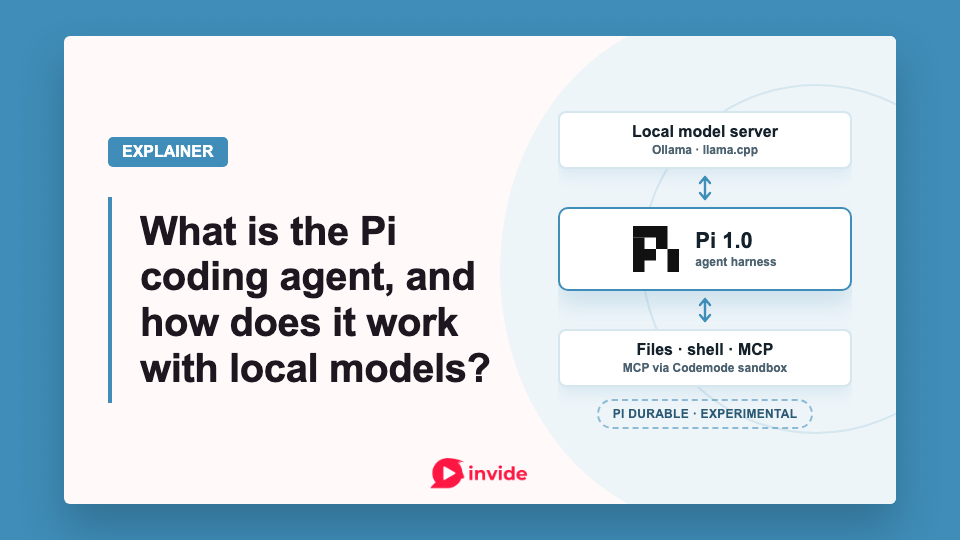
If you already run a local language model, Pi gives it a way to work through tasks in a folder: inspect files, run commands, make edits, and use the results to decide what to do next. You can use the same terminal agent with a hosted model, then customise its tools and instructions as your workflow needs change.
Earendil released Pi 1.0 on October 1, 2026, including built-in MCP support through Codemode. The experimental Pi Durable package shipped alongside it.
What does Pi do?
Pi is an agent harness. It assembles the instructions and conversation for a model request, executes the tools the model asks to use, records their results, and sends them back when another model response is needed. The agent loop documentation describes how those requests, tools, and saved sessions fit together.
For a coding task, the model can ask Pi to read a source file, edit that file, and run a test through the shell. Pi carries out the steps. A local inference server or a cloud provider writes the replies, and you can switch models without replacing the tools, instructions, or saved sessions. The model configuration is where you sign in to a provider, choose a model, or add a compatible endpoint.
Print mode is for one scripted task. If another program should drive Pi, use JSON event output or RPC. The TypeScript SDK is the path for embedding agent sessions in your own code, while day-to-day work stays in the terminal.
What changed in Pi 1.0?
Earendil's announcement lists built-in Model Context Protocol (MCP) support through Codemode, deferred tool loading, and extension support for virtual models. It also names Anthropic cache warming, transcript-aware changes to prompts and tools, a new terminal theme, and fullscreen operation by default.
Dates in the changelog show that the announcement gathers earlier work into the 1.0 milestone. Kimi-specific deferred tool loading arrived in 0.80.9 on July 16. Cache warming and transcript-aware prompt and tool updates followed in 0.86.0 on September 19. Version 0.99.0 on September 29 added MCP, Codemode, tool search, experimental virtual models, and the system theme.
Version 1.0.0 adds hardening and refinements, including leaner Codemode prompts, image generation from scripts, MCP OAuth fixes, and fullscreen by default. The changelog says leaner Codemode uses about 40% fewer prompt tokens. With the default tools and Codemode on, its GPT-5.6 example shrinks from about 5,300 to 3,300 prompt tokens. A local model's saving depends on its tokenizer and tool setup.
Codemode lets the model write JavaScript to coordinate tool calls. A script can fetch issues from a tracker, filter them, and return only the relevant records. Intermediate results can stay inside the script instead of entering the model's context after every call.
Pi's Codemode reference specifies a QuickJS sandbox without direct Node, filesystem, or network APIs. Scripts reach those resources through exposed tools. They can also invoke supported classifier and image models. Calls that complete before a script fails keep their effects; a failed script does not roll them back.
Earendil's explanation of its MCP decision says the team reconsidered MCP while changing how Pi exposes and composes tools. It wants discoverable tools that return structured data, which scripts can combine. The team also says many MCP servers still return text designed to go straight into model context. Built-in support removes the need for an MCP extension, but the server's output format still affects how well Codemode can use it.
If you run local models, test whether your chosen model can reliably compose those scripts. In the release discussion, Reddit user skabedi asks whether a model that was not trained on Codemode will stumble through it every session, or whether you will spend context teaching it through a system prompt or skill.
Which Pi packages do you need?
For ordinary terminal use, install @earendil-works/pi-coding-agent. That install includes every other package in the table below except pi-durable. The repository's package inventory separates the application from its underlying libraries:
| Package | What it does | When you would use it |
|---|---|---|
pi-coding-agent |
Terminal application and coding-agent SDK | Work interactively, automate the CLI, or embed its sessions |
pi-ai |
Unified API for model providers | Build an application that calls models through a shared API |
pi-agent-core |
Agent state, tool execution, and streamed events | Build an agent loop with your own application behaviour |
pi-tui |
Terminal UI library | Build or extend a terminal interface |
pi-durable |
Persistent conversations, tasks, and documents | Build applications with recoverable agent work |
chord |
Services, replicated state, RPC, and plugins | Compose application services and integrations |
pi-telemetry |
Telemetry contracts and a reference adapter | Integrate runtime telemetry |
All names in the table use the @earendil-works/ npm scope.
"Pi packages" also refers to installable bundles of customisations. The package documentation defines these as extensions, skills, prompt templates, and themes distributed together through npm, git, or a local directory.
An extension adds executable behaviour, such as a tool or command. Skills supply instructions and supporting files, which the agent loads when needed, and prompt templates expand reusable text. A theme changes terminal colours. One package can contain several of these resources.
Package declarations can be personal or project-local, and npm versions or git refs can be pinned. Extensions run inside the Pi process, so review a package's code before adding it. Packaging adds no isolation.
How do you connect Pi to local models?
A local setup has two running components. Your inference server loads the model and generates responses. Pi connects to that server and handles files, tools, instructions, and sessions. The steps below follow the documentation.
Pi's documentation covers direct integration with the llama.cpp router, plus compatible endpoints for Ollama, LM Studio, vLLM, and SGLang. Start with the server you already use. Changing the inference server and the agent at the same time makes failures harder to diagnose.
Connect an Ollama endpoint
Pi's quickstart requires Node.js 22.19 or newer for an npm installation. To try the release discussed here, pin its version:
npm install -g --ignore-scripts @earendil-works/pi-coding-agent@1.0.0
pi --version
On macOS or Linux, the quickstart also offers curl -fsSL https://pi.dev/install.sh | sh. The npm command above pins the version used in this article.
Pi stores user configuration in ~/.pi/agent by default. The configuration reference assigns compatible endpoints to models.json.
For Ollama, the model documentation supplies this example:
{
  "providers": {
    "ollama": {
      "baseUrl": "http://localhost:11434/v1",
      "api": "openai-completions",
      "apiKey": "ollama",
      "models": [
        { "id": "qwen2.5-coder:7b" }
      ]
    }
  }
}
Use the exact ID of a model available in your running Ollama server. The dummy key makes the provider available to Pi; Ollama ignores it. If you already have models.json, merge the provider entry into it.
Start pi in a test project and run /model to select the model. Opening the picker reloads models.json. Begin with a small task, such as explaining one function or making an edit you can check with an existing test.
Use the llama.cpp router
Pi's llama.cpp guide uses a current router-capable llama-server build. The router discovers GGUF files and loads models on demand. Start it without -m or --model, which would select single-model mode.
With GGUF files in ~/models, the guide starts the router like this:
llama-server \
  --models-dir ~/models \
  --no-models-autoload \
  --jinja \
  --host 127.0.0.1 \
  --port 8080 \
  -ngl 999 \
  -c 32768
--jinja enables compatible chat templates and tool calling. -ngl 999 offloads as many layers as possible to the GPU, while -c 32768 sets the context window. Lower the context size if loading exceeds available memory.
Inside Pi, /login llama.cpp configures the router connection. With --no-models-autoload, use /llama to load a model and /model to select it.
Turn Codemode on for a local model
Codemode is off by default. Pi turns it on when an MCP server with the default codemode exposure connects. In mcp.json, set "autoEnableCodemode": false beside mcpServers to keep it off. To enable Codemode without an MCP server, the CLI reference specifies this setting in ~/.pi/agent/settings.json or the project's .pi/settings.json:
{
  "defaultTools": ["+codemode"]
}
Merge the entry into existing settings, preserving any other defaultTools additions, then run /reload. The + adds Codemode to the default tools. Project settings load after project trust is granted.
A working connection is the first check. Then test whether the model calls the right tools, produces valid arguments, and completes edits without repeated repair. HN user whiteblossom reports using Pi to experiment with local models on consumer hardware, and their follow-up names Qwen3.5 4B and 9B for small tasks. Neither comment supplies a controlled comparison. Measure completed-task time and tool failures using the same model and server before deciding that a different harness improves your results.
How much customisation should you do?
Start with a model and a task. Add a skill when you repeatedly give the same procedural instructions, or an extension when you need behaviour the existing tools cannot provide.
Pi's session controls let you resume work and branch from earlier entries. Compaction summarises older conversation material for subsequent requests while retaining the original session entries. Saved history can therefore be longer than the history included in a particular model request.
The repository README says Pi has no built-in permission system for filesystem, process, network, or credential access. Pi's security documentation says it does not ask for approval before every tool call. Tools and extensions use the permissions of the process that launched them. The working directory sets defaults, but commands can reach other accessible paths. Project trust controls which project resources load. Context files such as AGENTS.override.md, AGENTS.md, and CLAUDE.md still load when trust is declined, unless context loading is disabled. Operating-system permissions, containers, or VMs provide execution boundaries.
In the HN release thread, igorbark describes an extension that keeps Pi on a laptop while routing file and shell operations to a VM. The same commenter finds the absence of built-in subagents and web search frustrating. Gondolin is a separate extension listed in the README. It keeps Pi and provider sign-in on the host, and it runs built-in tools and ! commands in a local Linux micro-VM.
The model can run on your machine while configured cloud providers and network-enabled tools send information elsewhere. Review those connections when keeping work local is part of your reason for using Pi.
When would you use Pi Durable?
Pi Durable is a separate experimental framework for building applications with long-running agent work. It adds stored tasks and checkpoints, concurrent conversations, and clients that can attach to the running harness. An application can provide a different execution environment for each conversation.
A support agent that answers messages through the day may restart while work is pending, and several people may need to observe or steer it. In the Durable HN discussion, azuanrb describes a Pi SDK application for Slack on-call channels running on Kubernetes. The commenter uses DBOS so sessions survive pod interruptions. They say it works, although it still feels like overkill, and they expect Durable to replace parts of that setup.
Durable's storage and replay documentation warns that its API changes without notice between releases. Pin the version when building on it and review API changes before upgrading. Tasks save checkpoints. Interrupted tools rerun only when declared safe to replay; other interrupted calls return an error to the model. A requestId deduplicates retried submissions, while external actions need their own protection against duplicate effects.
Storage choices include memory, SQLite, and JSONL. One process owns a storage instance, with no cross-process locking. SQLite's documented NORMAL setting survives process crashes, but recent commits can be lost on power or host failure. JSONL offers an fsync option before commit markers.
Use the coding CLI when you want to choose a model and customise its tools. Choose Pi Durable when you are building an application that must preserve pending work through process restarts. Before depending on it, test restart recovery, replay rules, and duplicate external effects against the failures your service must handle.
Member discussion