
What OpenAI announced at DevDay 2026 and what is available now
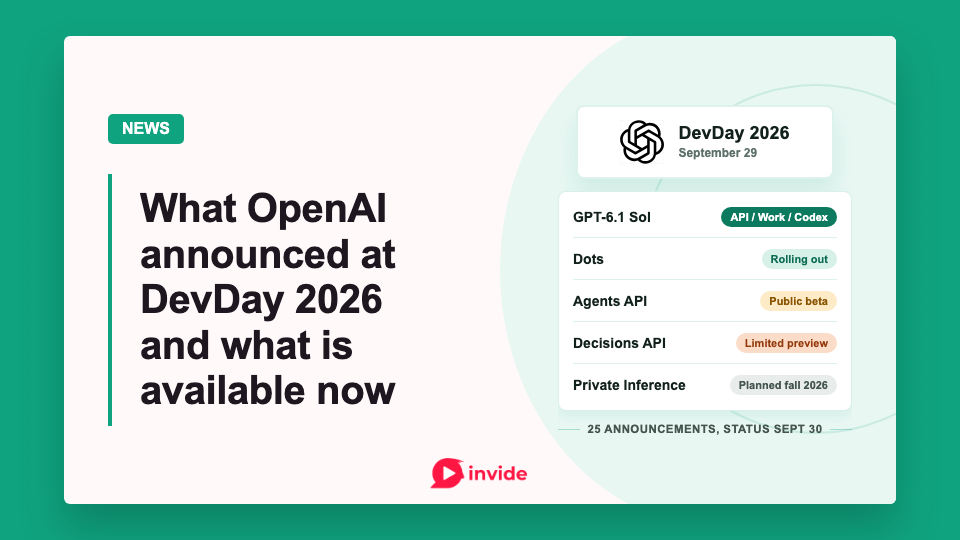
The OpenAI DevDay 2026 recap lists 25 announcements from the September 29 event. Availability as of September 30 depends on market, plan, and workspace settings.
| Announcement | Status on September 30 | Access | Next step |
|---|---|---|---|
| GPT-6.1 Sol | Available in API, Work, and Codex | API developers; Plus, Pro, Business, Enterprise, and Edu for Work and Codex | Chat access has not launched |
| Dots | Rolling out; enterprise beta | Pro and Business Premium in eligible markets; admin-enabled beta for Enterprise, Edu, and Healthcare | Specialist dots remain in enterprise pilots |
| Agents API with computer use | Public beta | API developers; also listed for Pro 500 and Enterprise in Work and Codex | General availability has no announced date |
| Decisions API | Limited preview | Preview participants | Broader release planned in the coming days |
| GPT-6 Astra Ultrafast | Available | API; Pro 500 and Enterprise in Work and Codex | GPT-6.1 Sol Ultrafast planned in the coming days |
| Plugin extensions | Available with platform limits | Recap says all plans; Free and Go web access is coming soon | Composer mentions currently require desktop |
| ChatGPT Space and Pages | Available | Pro, Business, and Enterprise | Mobile editing and collaborative slides are coming later |
| Private Inference | Preview planned for fall 2026 | Contact OpenAI for information | No specific launch date announced |
Dots bring persistent agents to ChatGPT
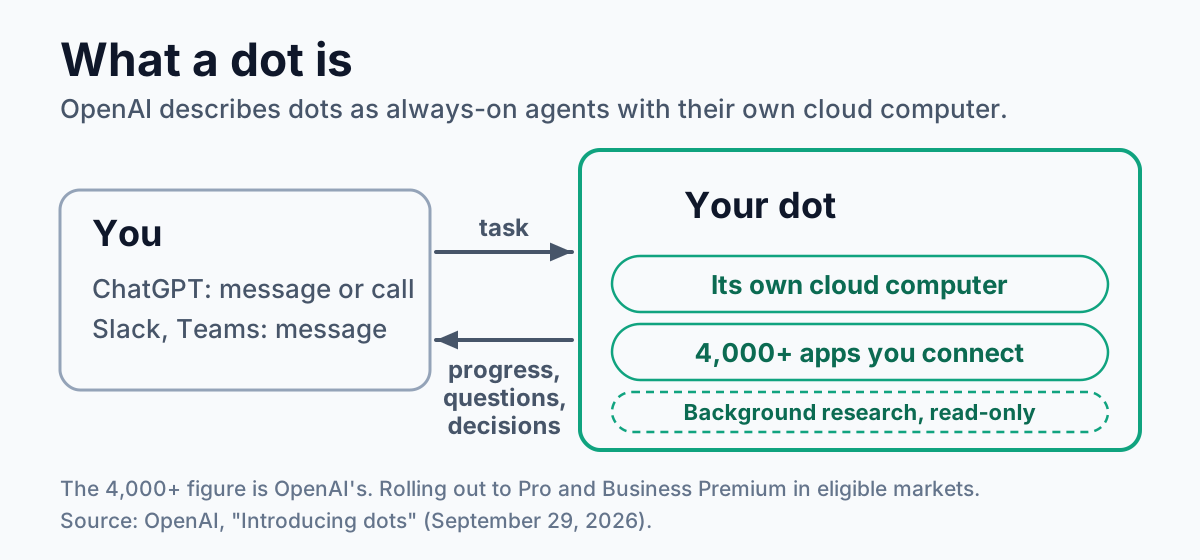
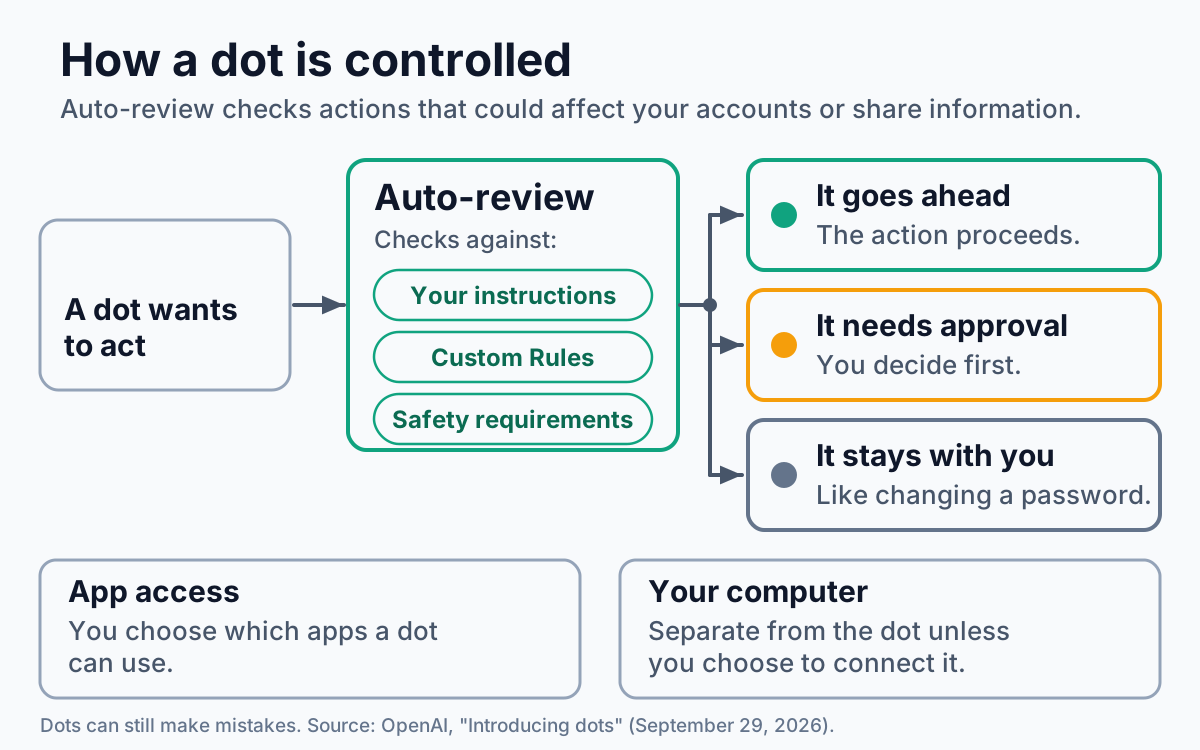
OpenAI's dots are agents for ongoing work. A dot has its own cloud computer, can use connected apps, and can continue working across tasks without the user directing each step. Dots run on GPT-6 Astra and can connect to more than 4,000 apps through the plugin ecosystem, according to OpenAI. Users can inspect a dot's work, set action rules, and decide which apps it can access. Dots run auto-review on actions that affect accounts or share information. Some actions, including password changes, always stay with the user.
OpenAI is rolling out dots to Pro and Business Premium users in eligible markets. Enterprise, Edu, and Healthcare workspaces can try a beta if an administrator enables it. Each eligible user starts with one dot. Dot conversations do not count toward ChatGPT usage limits, though Codex and ChatGPT Work tasks started by a dot do. OpenAI is testing specialist dots, which have organization-managed identities and responsibilities, in focused enterprise pilots. It also plans to integrate specialist dots with Microsoft Agent 365.
Users can message or call their dot in ChatGPT and message it in Slack or Teams. Dots can send progress updates and questions back to users; texting is coming later. Background "proactive research" uses connected apps through read-only tools when the user is away.
GPT-6.1 Sol nears Astra at GPT-6 Sol's standard prices
GPT-6.1 Sol is an upgrade to GPT-6 Sol aimed at coding, computer use, and professional tasks. In OpenAI's evaluations, GPT-6.1 Sol approaches GPT-6 Astra on several tasks at one-fifth of Astra's standard input and output token prices. Standard API prices are $2 per million input tokens and $10 per million output tokens, matching GPT-6 Sol. Cached input falls from $0.20 to $0.10 per million tokens. GPT-6.1 Sol matched Astra on DeepSWE v1.1 and finished within 2.1 percentage points of Astra on the offline OSWorld 2.0 set at maximum reasoning effort. Astra retained the highest score on Terminal-Bench Science 0.1.
Developers can call gpt-6.1-sol through the API. It is also available in ChatGPT Work and Codex for Plus, Pro, Business, Enterprise, and Edu users. OpenAI's launch post says Sol is not yet available in Chat.
Ultrafast is a new premium speed tier. GPT-6 Astra Ultrafast is available in the API and on Pro 500 and Enterprise plans in ChatGPT Work and Codex. OpenAI reports up to eight times faster generation in Codex, reaching 300 tokens per second, and up to six times faster generation in the API. GPT-6.1 Sol Ultrafast is planned for the coming days, with up to eight times faster generation in Codex than its standard speed.
Codex in the cloud and on other devices
Plus, Pro, Business, Healthcare, Education, and Enterprise users can run Codex locally on a computer, remotely from a phone, or in the cloud from any device. Reusable development environments give teams a shared setup with approved settings and permissions.
The Codex CLI update adds voice input for starting and steering tasks and an /agents view for tracking delegated work. It also changes prompt editing, session resumption, worktrees, and the terminal interface. The update reaches all plans.
Code Review is available on all plans in the ChatGPT desktop app. It supports summaries, diff inspection, questions about possible issues, and feedback on GitHub pull requests or GitLab merge requests. Automatic cloud reviews can run while the developer is away. Pro, Business, Enterprise, and Edu users can use Codex Security Cloud on desktop or web to scan GitHub repositories on demand, on a schedule, or as new commits arrive. Codex investigates findings, deduplicates them, and prepares fixes in the cloud. Security Cloud also includes Daybreak Blue models without a separate Daybreak application.
Computer use and finite decisions in the APIs
The Agents API is in public beta and now supports computer use, alongside tool search, tool calling, context compaction, and Codex-style multi-agent work. OpenAI runs the Agents API harness. For general API tasks, developers can use an OpenAI sandbox, their own infrastructure, or a sandbox partner. The built-in computer-use setup is more specific: its guide requires an openai_hosted environment with desktop access enabled. All API developers can use the beta. Pro 500 and Enterprise users can also access Agents API computer use in Codex and ChatGPT Work.
The hosted browser asks the user to approve each new website origin, including public sites. That approval grants access to an origin; it does not enforce a separate confirmation before purchases or destructive changes. The guide says applications that need that guarantee should restrict the hosted browser to resources that cannot perform those actions or use a browser runtime they control. The documented browser authentication flow supports email, passwords, and verification codes, but not passkeys.
The new Decisions API handles choices with a finite set of answers. A developer supplies those answers and text or image context, and the service uses Luna to select one. Suggested uses include classification, request routing, and choosing an agent's next action. It is in limited preview, with a broader release planned in the coming days.
OpenAI and Amazon also announced Bedrock Managed Agents, powered by OpenAI. The service brings Agents API capabilities into AWS, with customization and integration with AWS resources, and runs the agents entirely in AWS.
Private Intelligence includes Zero Data Retention with Private Safety Processing, which OpenAI says supports automated safety review without personnel access to the underlying content. A Private Inference preview, described as combining confidential computing and verifiable controls, is planned for fall 2026.
Plugin panels, file viewers, and events
Plugin extensions let developers create a sidebar home, interactive panels alongside a conversation, and viewers for supported file types. The recap lists extensions for all plans, while the extension docs say web access for Free and Go users is coming soon and composer mentions currently work only in the desktop app. The announcements also include a Plugin Creator, a revised submission flow, and changes to directory ranking and recommendations. Users choose plugins and approve the access each receives.
Business, Enterprise, Healthcare, and Edu users can add supported ChatGPT plugins to Sites. Teammates use their own connected data and permissions. On all plans, plugin automations can respond to connected-app events. The developer guide requires MCP 2.0 protocol version 2026-07-28 and supports webhook delivery from the draft MCP Events specification. Polling and streaming are not supported. In OpenAI's example, a new project-board task triggers document reading and a draft plan.
Space and Pages organize team work
ChatGPT Space replaces Library for Pro, Business, and Enterprise users. It gives a team, ChatGPT, and a dot a shared place for pages and files. Pages are collaborative documents that can contain writing, research, charts, images, and visualizations. Space supports finding, reading, and sharing pages on mobile; mobile creation and editing are coming later.
Collaborative slides are scheduled for the coming weeks. The planned feature would let teammates and agents edit the same deck and export it to PowerPoint or Google Slides. Business and Enterprise users can also create teams, share work such as pages and plugins, and assign recurring team tasks. Team tasks can run on a schedule or respond to events in connected tools.
@ChatGPT in Slack and Microsoft Teams is available to Business and Enterprise users. A mention in a channel, thread, or direct message can draw on tools permitted by an administrator or an individual user. Teammates can join the conversation without an individual ChatGPT license. The Meetings plugin is in beta on the ChatGPT desktop app for macOS for Pro and Business users, while Enterprise customers can ask their account manager about a limited alpha. It saves notes and personal summaries with action items in Space; OpenAI says it deletes the audio after preparing the notes.
Plans, sign-in, and partner software
Shareable profiles collect a person's Sites and plugins, with workspace-limited skill sharing. Sign in with ChatGPT provides account sign-in and, for eligible Plus and Pro users in participating tools, use of their plan allowance across 16 partners. The new Pro 500 plan offers 25 times the Plus usage allowance and Ultrafast access. The OpenAI Marketplace lets eligible enterprise customers express interest in applying part of an existing OpenAI commitment to approved partner software.
What to test this week
Developers can test GPT-6.1 Sol against their current model on real tasks. If your application needs confirmation before purchases or destructive changes, test computer use only on sites that cannot make them. Origin approval alone does not provide that confirmation. Decisions API remains in limited preview. Private Inference, collaborative slides, and Sol Ultrafast have later release windows, so their production behavior and final access conditions remain open.
Member discussion